


Net 1 - Anomaly Detection
Description
Security Analyst พบการแจ้งเตือนจากระบบ IDS ที่สร้างมาพิเศษ สำหรับป้องกัน SCADA โดยระบบนี้จะแยก Network Packet ออกเป็น สถานะ Network Packet ที่ถูกโจมตี (0) และ Network Packet ใช้งานปกติ (1) จงตรวจสอบไฟล์ PCAP เพื่อหาการโจมตีทั้งหมด
URL ดาวน์โหลดโจทย์: https://static.wtctt24.p7z.pw/open_net1.zip
Solution
The data in the UDP packet that starts with 00 is from the attacker. Let’s try to filter and get flag with tshark command
tshark -r open_net1.pcapng -Y "udp" -T fields -e data.data | grep 00000000 | sed 's/00000000//g' | xxd -r -pNet 2 - TLS Private Key Leakage
Description
Red Teamer ได้เจาะเข้าไปในระบบเครือข่ายของกลุ่มแก๊งมิจฉาชีพ และแอบเก็บ Network Traffic ของโจรเอาไว้ ในภายหลังตำรวจได้เข้ายึดเซิร์ฟเวอร์โจรและได้นำไฟล์ Private Key ของ HTTPS ออกมา หน้าที่ของคุณในฐานะ ทีม Incident Response จงถอดรหัส Network Traffic ในไฟล์ PCAP ด้วย Private Key
URL ดาวน์โหลดโจทย์: https://static.wtctt24.p7z.pw/open_net2.zip
Solution
In the folder, They have server.pem. Let’s bring the private key to decrypt the packet by navigate to “Preferences > Protocols > TLS” 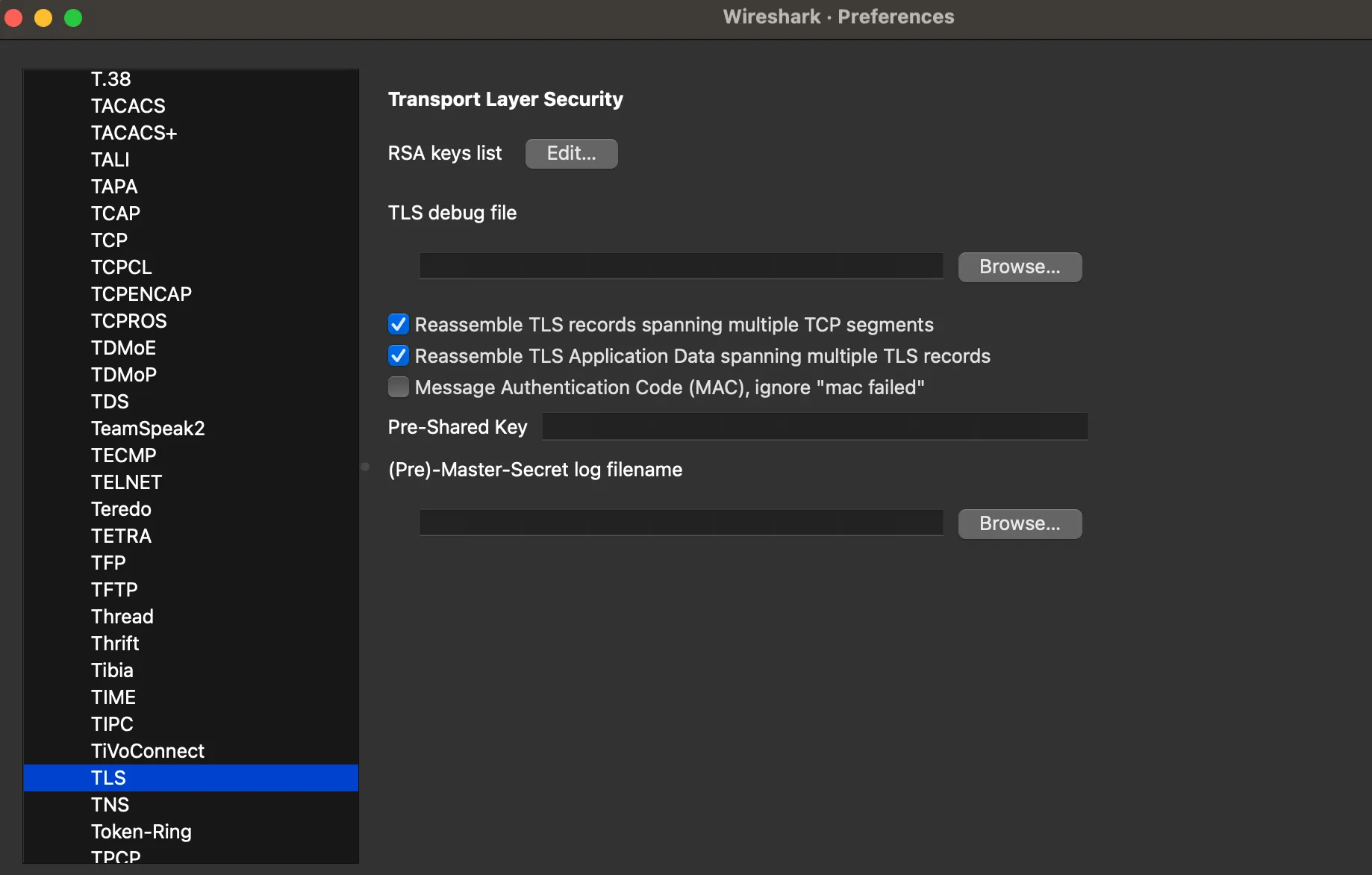 Next, clicked the edit button and fill the value follow by me
 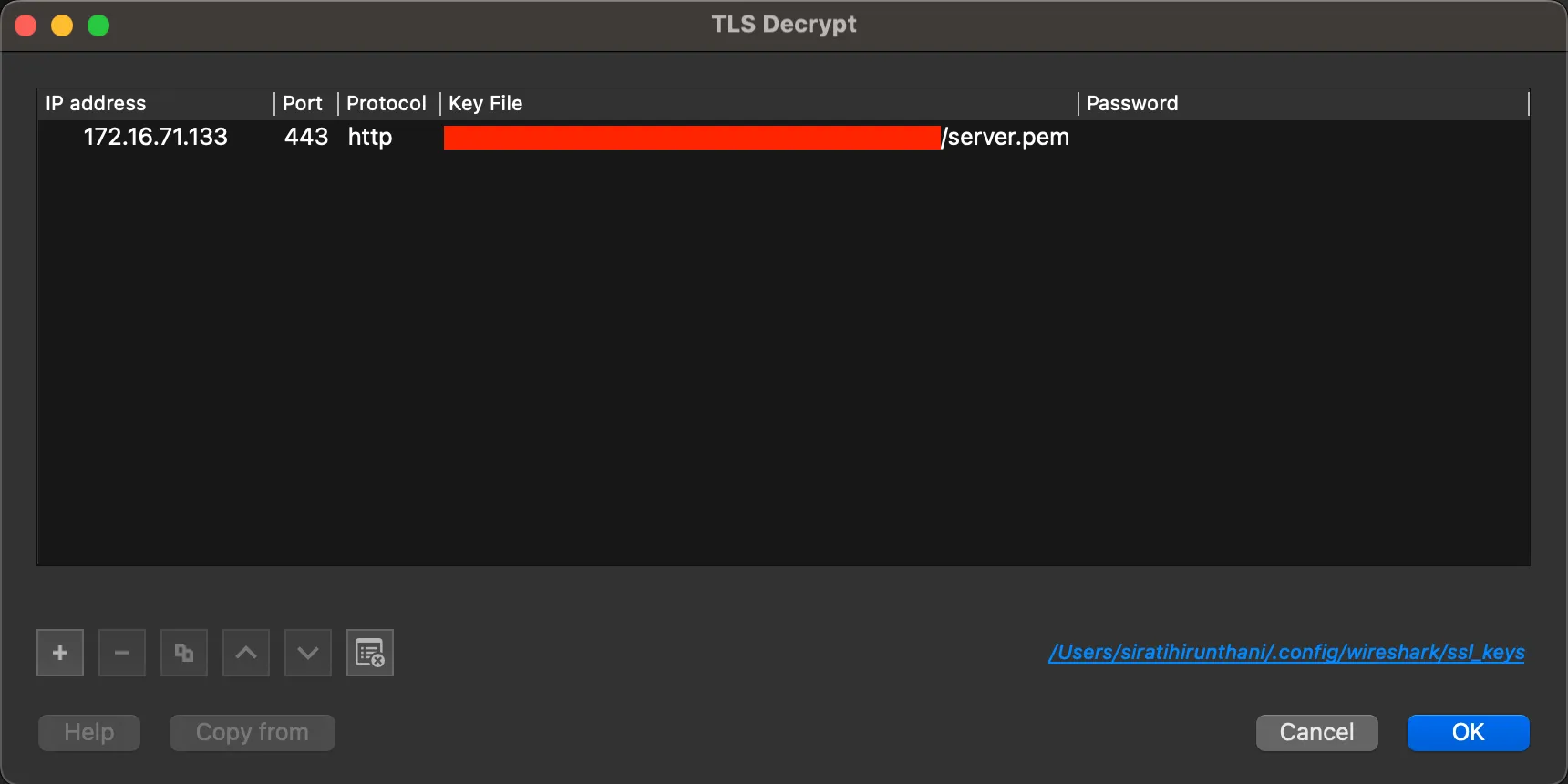 The flag is in packet 30.
Net 3 - Wi-Fi Kungfu
Description
หน่วยปฏิบัติการพิเศษของกองทัพ ได้รับรายงานว่ามีแก๊งมิจฉาชีพข้ามชาติซุ่มอยู่ในพื้นที่ของประเทศเพื่อนบ้าน โดยแก๊งดังกล่าวใช้ระบบ Wi-Fi Network บริเวณที่ตั้งของพวกเขาเป็นช่องทางสื่อสารและแลกเปลี่ยนข้อมูลผิดกฎหมาย
เจ้าหน้าที่สามารถเข้าถึงบริเวณรังของแก๊งได้ชั่วขณะ แต่ไม่สามารถปฏิบัติการเต็มรูปแบบได้เนื่องจากมีการเฝ้าเวรยามอย่างเข้มงวด ทำได้เพียงดักจับข้อมูล Network Traffic ของ Wi-Fi ที่กระจายอยู่ในอากาศกลับมาเท่านั้น
ขณะนี้ไฟล์ดักจับข้อมูล (PCAP) ได้ถูกส่งมายังศูนย์ปฏิบัติการ พร้อมรายละเอียดคร่าว ๆ ทางหน่วยขอความช่วยเหลือจาก คุณ ในฐานะผู้เชี่ยวชาญ CyberSecurity ที่เพิ่งสำเร็จการศึกษาระดับปริญญาเอกหมาด ๆ ให้ทำการวิเคราะห์และถอดรหัส Network Traffic ในไฟล์ดังกล่าวโดยด่วน!
ใช้ความสามารถของคุณถอดรหัส วิเคราะห์แพ็กเก็ต และค้นหาข้อมูลสำคัญที่ซ่อนอยู่ใน Traffic นั้น ภารกิจนี้อาจเป็นกุญแจสำคัญที่นำไปสู่การจัดการเครือข่ายอาชญากรรมข้ามชาติในครั้งนี้
URL ดาวน์โหลดโจทย์: https://static.wtctt24.p7z.pw/open_net3.zip
คำใบ้:
- หน่วยข่าวกรองแจ้งมาว่า รหัสผ่าน Wi-Fi แก๊งนี้มักจะใช้เป็น Pattern แบบ WTCTT24_[a-z0-9]{4} เช่น อาจจะเป็น WTCTT24_a0b1 หรือ WTCTT24_123e แนว ๆ นี้แน่ ๆ
Solution
Convert the pcapng file to hashcat format by using hcxtools, then using the hashcat in mode 22000 with attack mode 3 to decrypt wifi password
hashcat -m 22000 -a 3 file.hc22000 'WTCTT24_?a?a?a?a'The password of WIFI is WTCTT24_ac36, then bring the password to decrypt the packet by navigate to “Preferences > Protocols > IEEE 802.11 > Decryption Key (Edit)” and fill the value follow by me 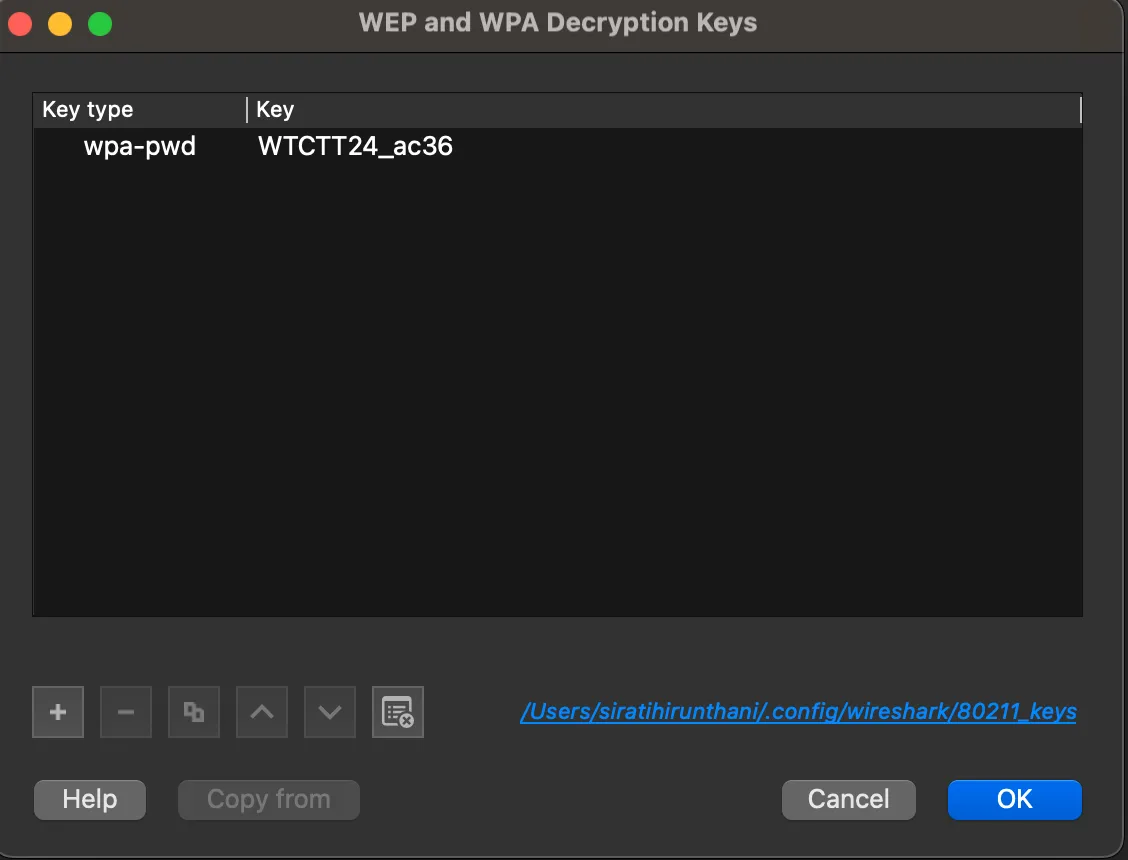 Find the flag in the packet by export PDF file by navigate to “File > Export Objects > HTTP > topsecret.pdf”
 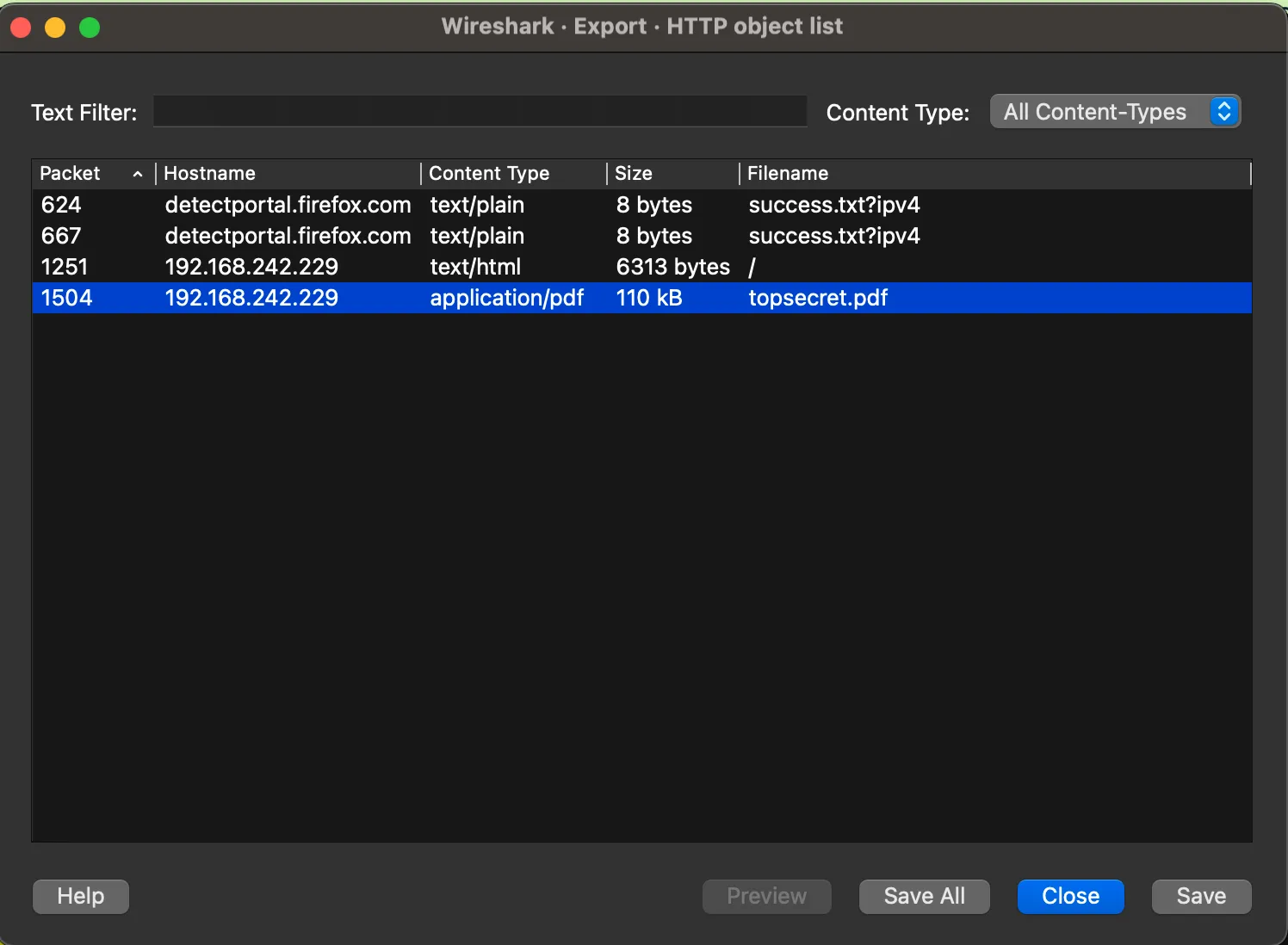 Used the exiftool for view the metadata of the file
exiftool topsecret.pdfNet 4 - Packet Storm
Description
เราได้เบาะแสจากกลุ่มแฮกเกอร์ระดับ APT และคุณได้รับมอบหมายให้ไปตรวจสอบไฟล์ PCAP นี้และแยกการโจมตีออกมาจาก Network Traffic ปกติ จากนั้นวิเคราะห์เหตุการณ์การโจมตีและคุณจะพบกับร่องรอยสำคัญ ที่นำไปสู่ความลับของแฮกเกอร์ที่มีค่า Flag
URL ดาวน์โหลดโจทย์: https://static.wtctt24.p7z.pw/open_net4.zip
Solution
After analysis the packet, It was found the many HTTP Packet, Let’s try to filter HTTP protocol
http && (http.response.code == 200)The flag was seperate by many part, Let’s try to find flag
packet 20311
packet 21557
packet 21611
We have 3 part of flag but it isn’t complete, then export zip file from packet by navigate to “File > Export Objects > HTTP”. Choose 1 file from list (feel free to use) 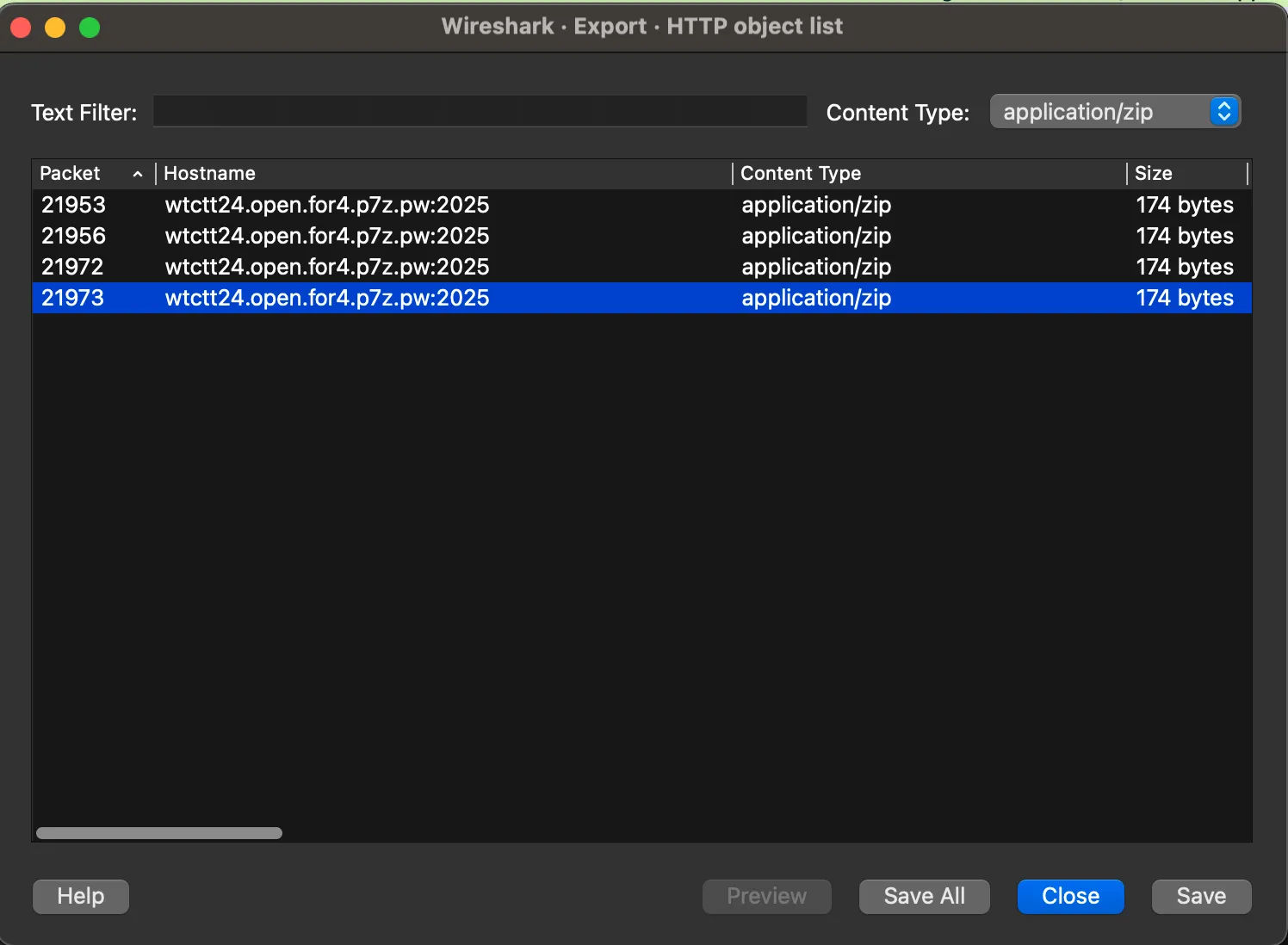 The zip file have a password, find the all password in packet file
strings open_net4.pcapng | grep phraram9
[...]
{"user":"phraram9","password":"p4ssw0rdp4ssw0rd"}
[...]
{"jwt":"eyJhbGciOiJIUzI1NiIsInR5cCI6IkpXVCJ9.eyJ1c2VybmFtZSI6InBocmFyYW05In0.CQ6TAapjXnYtgRecAohJAaeXb1lxryzxWMMU7cGIFks","message":"Login success for phraram9","role":"admin","secret":"4_7fe0e444d99"}
I have 5 parts of the flag, and in packet 21611, I found the words k and debug. In my opinion, these two words are part of some encryption. Let’s find the ciphertext by analyzing the HTTP packet, and I found a request for the ciphertext in packet 21636.
ciphertext=e96f1ecc5e77b52680058148983a262cNow, I know the ciphertext that encrypy by AES ECB Mode, Try to decrypt & get the flag